In my quest to make the C16 more usable, i.e. more like the environment I’m used to, i.e. a C64 with a Final Cartridge III, I’ve ported the Final Cartridge III monitor to the TED series (C16, C116, Plus/4).
I have reverse-engineered the interesting parts of the FC3 ROM before:
https://github.com/mist64/final_cartridge
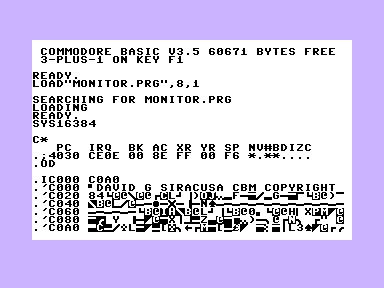
The code in the repository now also allows building the monitor standalone for the TED series:
make clean MACHINE=ted PROJECT=monitor monitor.prg
The resulting file is located at $4000 in RAM and can be started with
sys 16384
At the default address of $4000, it requires a memory extension on a C16/C116. By editing the key STARTADDRESS in projects/monitor/monitor.cfg, any address can be selected.
Here are some of the unique FC3 monitor features:
- Moving the cursor past the first or last line of the screen will continue dumps and disassemblies. It will even disassemble backwards. F3/F5 will also scroll up and down.
- The
Ocommand switches banks (TED: 0 = BASIC + KERNAL, F = all RAM).ODswitches to disk drive memory. - The
Icommand prints a CBM-ASCII-encoded memory dump. *R tt ss aaand*W tt ss aaread and write a disk block.
This is a great piece of retro-computing work! Porting the Final Cartridge III monitor to the TED series is a solid engineering effort, and the reverse-engineering notes on GitHub are a nice deep dive for anyone into C64/Plus/4 internals. The bank-switching and disk block read/write commands are especially handy for low-level debugging. For those who want to test their generated audio or voice prompts on vintage hardware, pairing this with a quick text-to-speech tool like this free MP3 generator can make documenting your sessions much easier. Keep up the great projects!
This is a really impressive piece of reverse-engineering work. I’ve spent quite a bit of time with the FC3 monitor on the C64, and seeing it ported to the TED series opens up a lot of low-level debugging possibilities for the Plus/4 that weren’t easily accessible before. The bank-switching and disk block read/write commands are the standout features for me. If anyone is documenting these debugging sessions or writing up detailed tutorials on this monitor, you might find it handy to clean up your notes with a tool that removes hidden text artifacts from AI-generated content, like this one: https://claudewatermarks.com/. It keeps your documentation crisp and professional. Thanks for sharing this project!
This is a fascinating deep dive into the TED series port. The reverse-engineering work on the FC3 ROM is impressive, and the ability to build the monitor standalone for the C16/Plus/4 opens up a lot of low-level debugging possibilities that were previously locked away. The bank-switching and disk block read/write commands are particularly useful for anyone doing serious hardware tinkering. If you’re recording or documenting these sessions for a tutorial, pairing this with a tool that generates clear audio explanations could make your content much more accessible—something like an AI voice generator can help streamline that process. Great project, and thanks for sharing the GitHub repo!
This is a really solid piece of reverse-engineering work. Porting the FC3 monitor to the TED series is no small feat, and the bank-switching plus disk block read/write commands make low-level debugging on the Plus/4 far more approachable. The ability to build it standalone from the repo is a nice touch for anyone who wants to tinker without a full cartridge setup. If you’re recording or narrating your debugging walkthroughs, pairing this with a quick audio tool like this free AI rap generator can turn your session notes into a catchy summary track—great for making technical content more engaging. Thanks for sharing the GitHub details!