If you type “WAIT6502,1” into a Commodore PET with BASIC V2 (1979), it will show the string “MICROSOFT!” at the top left corner of the screen. Legend has it Bill Gates himself inserted this easter egg “after he had had an argument with Commodore founder Jack Tramiel”, “just in case Commodore ever tried to claim that the code wasn’t from Microsoft”.
In this episode of “Computer Archeology“, we will not only examine this story, but also track down the history of Microsoft BASIC on various computers, and see see how Microsoft added a second easter egg to the TSR-80 Color Computer – because they had forgotten about the first one.
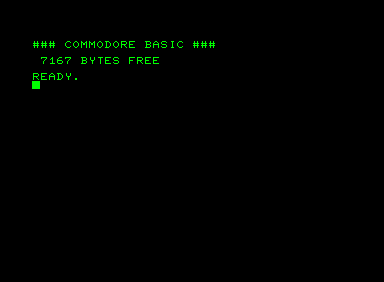
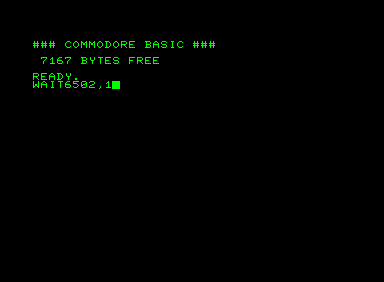
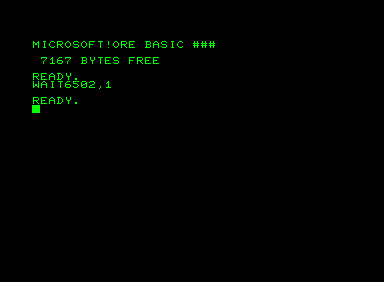
Stolen From Apple?
This whole story sounds similar to Apple embedding a “Stolen From Apple” icon into the Macintosh firmware in 1983, so that in case a cloner copies the ROM, in court, Steve Jobs could hit a few keys on the clone, revealing the icon and proving that not just a “functional mechanism” was copied but instead the whole software was copied verbatim.
Altair BASIC
Let’s dig into the history of Microsoft’s BASIC interpreters. In 1975, Microsoft (back then still spelled “Micro-soft”) released Altair BASIC, a 4 KB BASIC interpreter for the Intel 8080-based MITS Altair 8800, which, despite all its other limitations, included a 32 bit floating point library.

An extended version (BASIC-80) that consisted of 8 KB of code contained extra instructions and functions, and, most importantly, support for strings.
Microsoft BASIC for the 6502
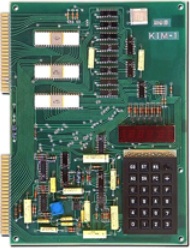
In 1976, MOS Technology launched the KIM-1, an evaluation board based around the new 6502 CPU from the same company. Microsoft converted their BASIC for the Intel 8080 to run on the 6502, keeping both the architecture of the interpreter and its data structures the same, and created two versions: an 8 KB version with a 32 bit floating point library (6 digits), and a 9 KB system with 40 bit floating point support (9 digits).
Some sources claim that, while BASIC for the 8080 was 8 KB in size, Microsoft just couldn’t fit BASIC 6502 into 8 KB, while other sources claim there was an 8KB version for the 6502. The truth is somewhere in the middle. The BASIC ROMs of the Ohio Scientific Model 500/600 (KIM-like microcomputer kits from 1977/1978) and the Compukit UK101 were indeed 8 KB in size, but unlike the 8080 version, it didn’t leave enough room for the machine-specific I/O code that had to be added by the OEM, so these machines required an extra ROM chip containing this I/O code.
In 1977, Microsoft changed the 6 digit floating point code to support 9 digits and included actual error stings instead of two-character codes, while leaving everything else unchanged. A 6502 machine with BASIC in ROM needed more than 8 KB anyway, why not make it a little bigger to add extra features. The 6 digit math code was still an assembly time option; the 1981 Atari Microsoft BASIC used that code.
In 1977, Ohio Scientific introduced the “Model 500”, which was the first machine to contain (6 digit) Microsoft BASIC 1.0 in ROM. Upon startup, it printed:
OSI 6502 BASIC VERSION 1.0 REV 3.2
COPYRIGHT 1977 BY MICROSOFT CO.
OK
In the same year, MOS started selling a tape version of 9 digit Microsoft BASIC 1.1 for the KIM-1. Its start message was:
MOS TECH 6502 BASIC V1.1
COPYRIGHT 1977 BY MICROSOFT CO.
OK
Woz Integer BASIC
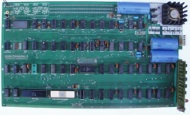
The 1976 Apple I was the first system besides the KIM to use the MOS 6502 CPU, but Steve Wozniak wrote his own 4KB BASIC interpreter instead of licensing Microsoft’s. An enhanced version of Woz’ “Integer BASIC” came in the ROM of the Apple II in 1977; Microsoft BASIC (called “AppleSoft”) was available as an option on tape. On the Apple II Plus (1978), AppleSoft II replaced Integer BASIC.
Commodore PET

Commodore had bought MOS in October 1976 and worked on converting the KIM platform into a complete computer system. They licensed Microsoft BASIC for 6502 (also October 1976), renamed it to Commodore BASIC, replaced the “OK” prompt with “READY.”, stripped out the copyright string and shipped it in the ROMs of the first Commodore PET in 1977.
The Easter Egg
In 1979, Commodore started shipping update ROMs with a version 2 of Commodore BASIC for existing PETs. Apart from updates in array handling, it also contained the WAIT 6502 easter egg.
This is what the easter egg code looks like:
.,D710 20 C6 D6  JSR $D6C6      fetch address and value
.,D713 86 46     STX $46        save second parameter
.,D715 A2 00     LDX #$00       default for third parameter
.,D717 20 76 00  JSR $76        CHRGOT get last character
.,D71A F0 29     BEQ $D745      no third parameter
.,D71C 20 CC D6  JSR $D6CC      check for comma and fetch parameter
.,D71F 86 47     STX $47        save 3rd parameter
.,D721 A0 00     LDY #$00
.,D723 B1 11     LDA ($11),Y    read from WAIT address
.,D725 45 47     EOR $47        second parameter
.,D727 25 46     AND $46        first parameter
.,D729 F0 F8     BEQ $D723      keep waiting
.,D72B 60        RTS            back to interpreter loop
On pre-V2 BASIC, the branch at $D71A just skipped the next line: If there is no third parameter, don’t fetch it. On V2, the line is subtly changed to make the two-parameter case branch to a small patch routine:
.,D745 A5 11     LDA $11        low byte of address
.,D747 C9 66     CMP #$66       = low of $1966 (=6502)
.,D749 D0 D4     BNE $D71F      no, back to original code
.,D74B A5 12     LDA $12        high byte of address
.,D74D E9 19     SBC #$19       = high of $1966 (=6502)
.,D74F D0 CE     BNE $D71F      no, back to original code
.,D751 85 11     STA $11        low byte of screen buffer = 0
.,D753 A8        TAY            index = 0
.,D754 A9 80     LDA #$80       high byte of screen buffer
.,D756 85 12     STA $12        screen buffer := $8000
.,D758 A2 0A     LDX #$0A       10 characters
.,D75A BD 81 E0  LDA $E081,X    read character
.,D75D 29 3F     AND #$3F       throw away upper bits
.,D75F 91 11     STA ($11),Y    store into screen RAM
.,D761 C8        INY
.,D762 D0 02     BNE $D766      no carry
.,D764 E6 12     INC $12        increment screen buffer high address
.,D766 CA        DEX
.,D767 D0 F1     BNE $D75A      next character
.,D769 C6 46     DEC $46
.,D76B D0 EB     BNE $D758      repeat n times
.,D76D 60        RTS            back to interpreter loop
The text “MICROSOFT!” is stored in 10 consecutive bytes at $E082, cleverly hidden after a table of coefficients that is used for the SIN() function:
.;E063 05                        6 coefficients for SIN()
.;E064 84 E6 1A 2D 1B            -((2*PI)**11)/11! = -14.3813907
.;E069 86 28 07 FB F8             ((2*PI)**9)/9!   =  42.0077971
.;E06E 87 99 68 89 01            -((2*PI)**7)/7!   = -76.7041703
.;E073 87 23 35 DF E1             ((2*PI)**5)/5!   =  81.6052237
.;E078 86 A5 5D E7 28            -((2*PI)**3)/3!   = -41.3147021
.;E07D 83 49 0F DA A2               2*PI           =  6.28318531
.;E082 A1 54 46 8F 13            "SOFT!" | backwards and with
.;E087 8F 52 43 89 CD            "MICRO" | random upper bits
If we reverse the bytes, we get
CD 89 43 52 8F 13 8F 46 54 A1
The easter egg code clears the upper 2 bits, resulting in
0D 09 03 12 0F 13 0F 06 14 21
The easter egg code does not print the characters through library routines, but instead writes the values directly into screen RAM. While BASIC used the ASCII character encoding, the Commodore character set had its own encoding, with “A” starting at $01, but leaving digits and special characters at the same positions as in ASCII. Thus, the 10 hidden and obfuscated bytes decode into:
MICROSOFT!
Microsoft’s Code?
Commodore engineers are known for putting easter eggs into ROM, but there would be no reason for them to encode the string “MICROSOFT!” and hide it so well. The “WAIT 6502” easter egg did not show up in Commodore BASIC until version 2, which is in contrast to almost all sources claiming Commodore licensed Microsoft BASIC for a flat fee and never returned to Microsoft for updates, but continued improving BASIC internally.
Commodore had indeed updated its source with Microsoft’s changes since V1. 6502 guru Jim Butterfield states:
Commodore paid Microsoft an additional fee to write a revision to the original BASIC that they had bought. Among other things, spaces-in-keywords were changed, zero page shifted around, and (unknown to Commodore) the WAIT 6502,x joke was inserted.
Targeting Commodore?
While all of Microsoft BASIC only depends on the CPU, makes no other assumptions on the hardware it runs on (be it Commodore, Apple, Atari, …), and does all its input and output by calling into ROM functions external to BASIC, the easter egg writes directly to screen RAM at a fixed address of $8000, and uses the PET character encoding for it: The easter egg has clearly been written specifically for the PET.
We can only speculate on the reasons why Microsoft and possibly Bill Gates himself added the easter egg. A possible reason is that Microsoft wanted to make sure Commodore cannot take credit for “Commodore BASIC” – similar to the “Stolen From Apple” case.
Or it was only about showing the world who really wrote it. Jim Butterfield: As an afterthought, Microsoft would have liked to see their name come up on the screen. But it wasn’t in the contract.
Commodore’s Reaction
The easter egg only exists in BASIC version 2 on the PET. All later Commodore computers didn’t contain it: The branch was restored and the extra code as well as the 10 bytes hidden after the SIN() coefficients were removed.
Jim Butterfield: Shortly after that implementation, I show this to Len Tramiel [of Commodore engineering] at the Commodore booth of a CES show. He was enraged: “We have a machine that’s short of memory space, and the #$#!* [Gates] put that kind of stuff in!!”
Commodore employee Andy Finkel states that the “Gates” (!) easter egg had to be removed for space reasons. It had occupied 51 extra bytes.
Interestingly, starting with the BASIC V7 on the C128 six years later, Commodore started crediting Microsoft, like this:
        COMMODORE BASIC V7.0 122365 BYTES FREE
          (C)1985 COMMODORE ELECTRONICS, LTD.
                (C)1977 MICROSOFT CORP.
                  ALL RIGHTS RESERVED
According to Jim Butterfield, this is probably due to negotiations concerning Microsoft BASIC for the Amiga.
The Easter Egg before the PET
But Microsoft did not encode its company name specifically for Commodore: The 9 digit BASIC 6502 version 1.1 for the KIM-1 contained the 10 hidden bytes:
.;3FAA 05                        6 coefficients for SIN()
.;3FAB 84 E6 1A 2D 1B            -((2*PI)^11)/11! = -14.3813907
.;3FB0 86 28 07 FB F8             ((2*PI)^9)/9!   =  42.0077971
.;3FB5 87 99 68 89 01            -((2*PI)^7)/7!   = -76.7041703
.;3FBA 87 23 35 DF E1             ((2*PI)^5)/5!   =  81.6052237
.;3FBF 86 A5 5D E7 28            -((2*PI)^3)/3!   = -41.3147021
.;3FC4 83 49 0F DA A2               2*PI           =  6.28318531
.;3FC9 A6 D3 C1 C8 D4            "!TFOS"
.;3FCE C8 D5 C4 CE CA            "ORCIM"
The extra bytes here are:
A6 D3 C1 C8 D4 C8 D5 C4 CE CA
If we XOR every byte with 0x87, we get:
21 54 46 4f 53 4f 52 43 49 4d
which, again, is “MICROSOFT!” backwards, but this time in the ASCII encoding. (Note that no XOR or add/sub can be found for the 10 bytes in Commodore BASIC that would convert them into ASCII instead of PETSCII. Also, thanks to Tom for his help here.)
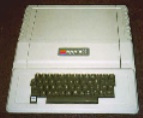
The version of Microsoft BASIC for the 6502-based Apple II, called “AppleSoft“, contains the same 10 bytes after the coefficients in all tape and ROM versions. On AppleSoft II, for example, they are located at address $F075.
KIM-1 BASIC was released in 1977, AppleSoft II in spring 1978, and the V2 ROM of the PET in spring 1979. So Microsoft didn’t “target” Commodore with this at first, but probably put the data in for all their customers – possibly right after they had shipped the easteregg free V1 to Commodore. And when Commodore came back to them, they changed their codebase to encode string differently and added the easter egg code to show the string.
The Easter Egg after the PET
After the second source drop to Commodore, they removed the “WAIT6502” code again, but kept the 10 encoded bytes in their master codebase: Every non-Commodore post-1978 6502 Microsoft BASIC with the 40 bit floating point library contains the 10 encoded bytes after the SIN() coefficients – still in PET encoding:
- Tangerine Microtan 65
- Tangerine Oric-1 and Oric-Atmos
- Pravetz 8D
This is a snippet from microtan/tanex_h2.rom:
0000fd8: 0f da a2 a1 54 46 8f 13  ....TF..
0000fe0: 8f 52 43 89 cd a5 d5 48  .RC....H
The ROM of the Ohio Scientific Superboard II (and its clone, the Compukit UK101) as well as the Atari Microsoft BASIC tape are based on the 32 bit floating point version and don’t contain the easter egg data.
“MICROSOFT!” on the 6800 and the 6809

It doesn’t stop there: Even the BASIC versions on the TRS-80 Color Computer and the TRS-80 MC-10, which were versions for the 6809 and 6800 CPU architectures, respectively (BASIC-69 and BASIC-68), had the encoded “MICROSOFT!” string after the SIN() coefficients. Here is a snippet of Spectral Associates’ disassembly of the CoCo ROM in his book “Color Basic Unravelled II“
                       * MODIFIED TAYLOR SERIES SIN COEFFICIENTS
BFC7 05                LBFC7   FCB   6-1                   SIX COEFFICIENTS
BFC8 84 E6 1A 2D 1B    LBFC8   FCB   $84,$E6,$1A,$2D,$1B   * -((2*PI)**11)/11!
BFCD 86 28 07 FB F8    LBFC8   FCB   $86,$28,$07,$FB,$F8   *  ((2*PI)**9)/9!
BFD2 87 99 68 89 01    LBFD2   FCB   $87,$99,$68,$89,$01   * -((2*PI)**7)/7!
BFD7 87 23 35 DF E1    LBFD7   FCB   $87,$23,$35,$DF,$E1   *  ((2*PI)**5)/5!
BFDC 86 A5 5D E7 28    LBFDC   FCB   $86,$A5,$5D,$E7,$28   * -((2*PI)**3)/3!
BFE1 83 49 0F DA A2    LBFE1   FCB   $83,$49,$0F,$DA,$A2   *    2*PI

BFE6 A1 54 46 8F 13 8F LBFE6   FCB   $A1,$54,$46,$8F,$13   UNUSED GARBAGE BYTES
BFEC 52 43 89 CD               FCB   $8F,$52,$43,$89,$CD   UNUSED GARBAGE BYTES
You can tell that Microsoft didn’t reimplement BASIC for the remaining 8 bit architectures, but practically converted the 6502 code, copying all constants verbatim, even the ones they did not understand, since these are still the obfuscated bytes in PET-encoding.
A Second Easter Egg on the Color Computer
The TSR-80 Color Computer (1980) also has an easter egg in BASIC: If you type “CLS9” (or any higher number), it will clear the screen and print “MICROSOFT”.
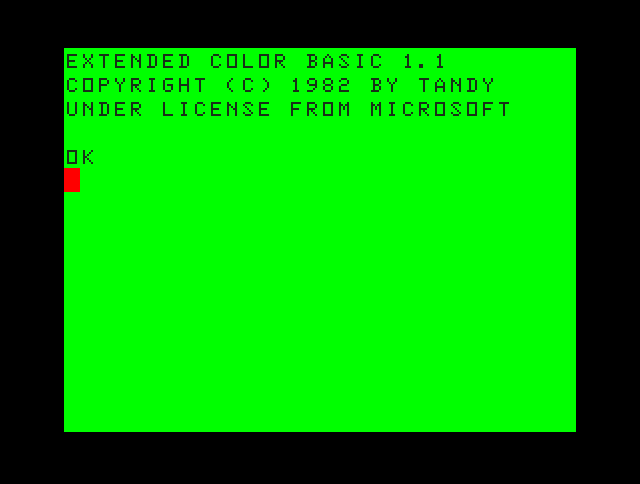
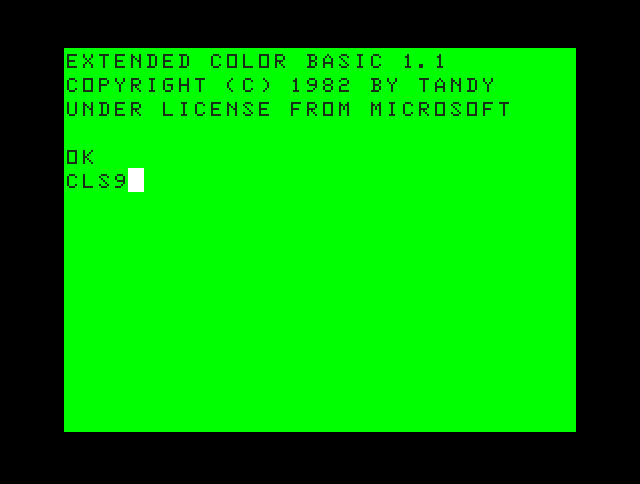
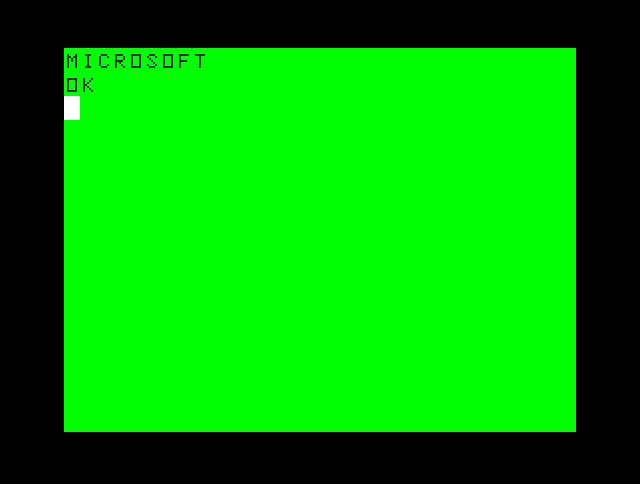
Let’s see how it is done:
* CLS
A910 BD 01 A0 CLS JSR RVEC22 HOOK INTO RAM
A913 27 13 BEQ LA928 BRANCH IF NO ARGUMENT
A915 BD B7 0B JSR LB70B CALCULATE ARGUMENT, RETURN VALUE IN ACCB
A918 C1 08 CMPB #8 VALID ARGUMENT?
A91A 22 1B BHI LA937 IF ARGUMENT >8, GO PRINT âMICROSOFTâ
[...]
A937 8D EF LA937 BSR LA928 CLEAR SCREEN
A939 8E A1 65 LDX #LA166-1 *
A93C 7E B9 9C JMP LB99C * PRINT âMICROSOFTâ
The string to be printed is stored here:
A166 4D 49 43 52 4F 53 LA166 FCC 'MICROSOFT'
A16C 4F 46 54
A16F 0D 00             LA16F FCB CR,$00
That’s right, Microsoft added a different easter egg, and included the string “MICROSOFT” again, this time in cleartext. They seem to have forgotten about the obfuscated 10 bytes intended for the PET that had been copied from the 6502 version to the 6800 during conversion, and had still been present in the Color Computer ROM.
The same easter egg exists on the 6800-based TRS-80 MC-10 (also 1980), which also had the 10 PET bytes in ROM:
FBBF 27 13                BEQ $FBD4       ; branch if no argument
FBC1 BD EF 0D             JSR $EF0D       ; get argument
FBC4 C1 08                CMPB #$08       ; easter egg?
FBC6 22 1D                BHI $FBE5       ; yes
[...]
FBE5 8D ED                BSR $FBD4       ; clear screen
FBE7 CE F8 33             LDX #$F834-1
FBEA 7E E7 A8             JMP $E7A8       ; print "MICROSOFT"
[...]
F834 4D 49 43 52 4F       FCC "MICROSOFT"
F834 53 4F 46 54 0D       FCB $0D
F834 00                   FCB $00
[...]
F724 A1 54 46 8F 13       FCB $A1,$54,$46,$8F,$13 ; "!TFOS"
F729 8F 52 43 89 CD       FCB $8F,$52,$43,$89,$CD ; "ORCIM"
Microsoft BASIC 6502 Timeline
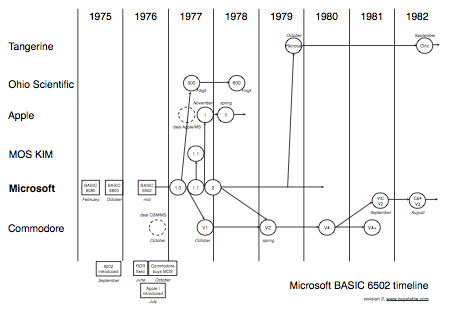
- Version 1.0 (in the 6 digit version) is used on the Ohio Scientific, and contains a major bug in the garbage collection code.
- Version 1.0 (in the 9 digit version) is also used in the first Commodore PET as Commodore BASIC V1. It is the oldest known Microsoft BASIC to support 9 digit floating point.
- Version 1.1, which contained bug fixes, is used on the KIM-1. It is the oldest version to contain the “MICROSOFT!” string (in ASCII).
- AppleSoft BASIC I is forked from Microsoft BASIC 1.1. It contains the ASCII string.
- Microsoft BASIC version 2 changes the ASCII string to PET screencode, adds the easter egg code, and is given to Commodore.
- The code is removed again after the source drop to Commodore. The Tangerine Microtan is based on this.
- Apple, Commodore and Tangerine continue development of their respective forks without the involvement of Microsoft.
- The BASIC V2 used on the VIC-20 and the C64 is actually a stripped-down version of PET BASIC 4.0 and not a ported version of PET BASIC V2.
So did Bill Gates write it himself?
Altair BASIC was written by Bill Gates, Paul Allen (the founders of Microsoft) and Monte Davidoff (a contractor), as comments in the original source printout show:
00560  PAUL ALLEN WROTE THE NON-RUNTIME STUFF.
00580  BILL GATES WROTE THE RUNTIME STUFF.
00600  MONTE DAVIDOFF WROTE THE MATH PACKAGE.
Bill Gates wrote “the runtime stuff” (which probably means the implementation of the instructions), as opposed to “the non-runtime stuff” (probably meaning tokenization, memory management) and “the math package”. Consequently, the implementation of the WAIT command would have been his work – on the 8080, at least.
Now who wrote the 6502 version? The KIM-1 BASIC manual credits Gates, Allen and Davidoff, the original authors of the 8080 version, but it might only be left over from the manual for the 8080 version. Davidoff, who worked for Microsoft in the summers of 1975 and 1977, had not been there when BASIC 6502 was written in the summer of 1976, but he probably changed the 6 digit floating point code into the 9 digit version that is first found in BASIC 6502 1.1 (KIM-1, 1977).
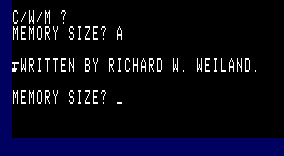
The ROM of the 1977/1978 Ohio Superboard II Model 500/600 (6 digit BASIC 1.0) credits RICHARD W. WEILAND, and the 1977 9 digit KIM-1 BASIC 1.1 as well as the 1981 Atari Microsoft BASIC 2.7 credit “WEILAND & GATES”. Ric Weiland was the second Microsoft employee. These credits, again, were easter eggs: While they were clearly visible when looking at the ROM dump, they were only printed when the user entered “A” when BASIC asked for the memory size.
According to apple2history.org, Marc McDonald (employee number 1) wrote the 6502 version, but it is more likely that McDonald wrote the 6800 simulator and Weiland ported 8080 BASIC to the 6800 and then McDonald adapted the 6800 simulator to the 6502 and Weiland wrote the 6502 BASIC.
This and the hidden credits in version 1.0 of 6502 BASIC suggest that Weiland was the main author of 6502 BASIC. Gates is added to the hidden credits in the 1.1 version, so Gates probably contributed to the 1.1 update..
So it is very possible that Gates wrote the easter egg code himself, given that he was responsible for the implementation of WAIT on the 8080, he is credited in BASIC 6502 1.1+, Finkel and Butterfield refer to WAIT6502 as “Gates'” easter egg – and after all, he can write code.
Open Questions
- What was Atari’s version based on? What versions were there? Atari Microsoft BASIC images are very hard to find.
- Why did Atari use the 6 digit version, if they extended it with lots of commands (so size couldn’t have been an issue)?
Annotated Disassembly of Different Versions
- Altair BASIC 3.2 (4K) (8080)
- Commodore 64 BASIC V2 (6502)
- Commodore PET BASIC V1, V2, V4 (6502)
- AppleSoft (6502)
- TRS-80 Color Computer (6809)
Fun little piece of digital archeology!
Here’s hoping Paul, Bill, or Monte will chime in with a comment…
Great read! Thanks
That’s an excellent piece of research. Beautiful! Your other posts are great, too, and make me wish that you will bundle them into a book one day…
This is the most interesting thing I’ve seen all day. I just bookmarked it to come back.
Thanks,
I’ll have to dig through your archives, and if you don’t have more like this then start writing!
Thanks, good work.
Good question to ask Bill Gates next time any of us gets an interview opportunity with him. 🙂
Brilliant post! So thorough, well-illustrated, and I would think it’s fascinating to non-techs too.
“The same easter egg exists on the 6800-based TRS-80 MC-1 (also 1980)” — I haven’t heard of this machine; was it a variant of the Color Computer? Can you point me to something about it? (A quick Google didn’t find anything useful.)
I know of the MC-10, of course; but that was a few years later, and based on the 6803. I’ve never heard of any TRS-80 based on the 6800 proper.
The author seems to be confusing a couple machines.
The TRS-80 Color Computer came out in 1980, but it was based on the 6809 which is somewhat source compatible with the 6800.
The MC-10 came out several years later (83?), but it was based on the 6803. The 6803 will run 6800 binary code, but it would be quite a bit faster if it took advantage of the additional features of the 6803.
The 6800 version would have run on Flex. I’m sure the other versions were derived from it due to the level of source code compatibility.
Oh I so loved my 8 Bit Commodore back in the day. those were the days!
Jiff
http://www.anonweb.eu.tc
The “Stolen from Apple” icon did exist, but it was in the Mac, not the Apple II.
http://folklore.org/StoryView.py?project=Macintosh&story=Stolen_From_Apple.txt&topic=Software%20Design
@John Stracke: Sorry, that was a typo. It’s “MC-10”, which is indeed 6803-based, but it’s a variant of the 6800.
@Jerry Kindall: You are right. I confused it with the court case that lead to the inclusion of the icon, and that court case was about the Apple II.
Thanks for noting! I fixed both mistakes.
Great story.
In 1977 and 1978 I worked at the Retail Computer Store in Seattle, Washington.
We sold products from Altair, Imsai, Processor Technology, and others. One day a very strange color terminal device showed up. It was from a new company called CompuColor. Although sold as an “intelligent terminal” it had an 8080 processor and BASIC inside.
Having spent a lot of time using Altair BASIC, it was pretty clear to me that CompuColor had either licensed or simply copied it for their own use.
One day, believe it or not, Bill Gates himself walked in to the store! I happened to show him the CompuColor and he was quite intrigued. In fact, he restarted it and when the interpreter asked “Memory Size?” on startup, he entered a magic key sequence (I think it was Control-A) and the system printed out something like “Written by Paul Allen, Bill Gates, and Monte Davidoff.”
This was a smoking gun and I’m sure Bill sent him lawyers after them shortly thereafter.
@Jeff Barr — you witnessed a formative piece of history! After Bill Gates realized the CompuColor was running code derived from ALTAIR BASIC, from there he tracked down Greg Whitten, who had re-vamped the code for the CompuColor. Instead of suing them, he felt that the enhancements were significant enough that he just wanted the rights to use it. So that became the basis of GW-BASIC in DOS. For years people had thought it stood for “Gee Whiz” basic, but really it was Greg Whitten’s version of BASIC.
“Sorry, that was a typo. Itâs âMC-10âł” — Got it, thanks. I couldn’t tell if it was an ordinary mistake or an extraordinary bit of history.
Oh, and nice article. 🙂
These little tid bits of cpu history are brilliant!
There possibly might be some answers here: http://www.folklore.org (Andy Hertzfeld’s rather excellent site).
This stuff makes my day. Thank you. 🙂
Ohio Scientific’s Challenger had a similar easter egg. When you start it up, it asks D/C/W/M (Disk boot, Cold start, Warm start, or Monitor), followed by the memory size prompt. At “memory size’ if you enter A it will say “Written by Bill Gates”.
Isn’t Applesoft I here? http://www.pagetable.com/?p=32
@Mike Cohen: Are you sure it credited Bill Gates only? I clarified the paragraph about the “hidden” credits (memory size “A”) and added a screenshot of the OSI Model 600. Its 1977 ROM credits Weiland; the KIM’s 1977 ROM credits Weiland and Gates, and the 1981 Atari Microsoft BASIC 2.7 tape credits Weiland and Gates as well. I haven’t seen a version with only Gates’ name. What Challenger model was this, and what year was it made in? Do you remember what version number of BASIC it printed or whether it supported disk/tape/graphics instructions?
@Faried Nawaz: “AppleSoft” is the BASIC based on Microsoft BASIC that was offered for the Apple II. “Apple I BASIC” is written by Woz and unrelated.
I just took a quick peek at the Intellivision Keyboard Component’s BASIC ROM dump to see if I could find the floating point tables. (The Keyboard was a 6502-based machine, and its BASIC ROM was 8K.)
I didn’t find any of the 40-bit constants mentioned above, so I presume that the Intellivision version that Mattel picked up was the version with 32-bit floating point.
The Intellivision BASIC reports itself as:
INTELLIVISION BASIC
Copyright Microsoft, Mattel 1980
I wonder where it fits in the time line you have above? FWIW, it doesn’t seem to have a WAIT keyword, and it uses 2-letter error codes. (It does have VSAV/VLOD, which seem to be for audio playback on the tape… This *is* a unique machine.) The errors it reports are: GO, NF, SN, RG, OD, FC, OV, OM, US, BS, DD, /0, ID, TM, LS, ST, CN, UF, TR, TP
As for easter eggs, I don’t know if Intellivision BASIC has any. I know the Keyboard’s System ROM does have at least one. There are a number of compressed strings that can be expanded with special escapes. (These were character numbers > 255 if arriving via 10-bit wide RAM shared with the Master Component, or a three byte sequence if generated directly on the Keyboard Component from the 6502. A very odd machine.)
These strings compress down many common phrases and phrase fragments. Two of the strings in this table are “K. Smith” and “L. Zwick”, two of the main programmers for this ROM. So, with an appropriate “PRINT” statement you could get the programmer’s names to appear. In fact, I believe it was possible to get the names to appear in the “typewriter” mode as well.
On a different note, the Mattel Aquarius (a Z80 based machine) also has Microsoft BASIC built in. I don’t have a dump of its ROM though.
I wonder what sort of language a modern Bill Gates could do in 8K of 8086?
Any chance you might still have this machine?
You are misattributing Walter K. Zydhek for the creation of the commented dissasembly of the CoCo’s ROM. Walter did the excellent PDF conversion of Spectral Associates’ (uncredited) Unravelled series.
@Joe Zbiciak: A ROM that contains the 40 bit library will always contain the bytes 84 E6 1A 2D 1B, and a ROM with the 32 bit library will always contain 86 1E D7 FB.
You can look at the list of keywords at the beginning of the ROM (last character has bit #7 set) and compare it with other ROMs.
And of course, I would be happy to look at the ROM you have!
@tim lindner: Thanks a lot for the hint, I should have read the full foreword! Fixed.
Sun Microsystems also had a “security” device in its PROM which it feared would be copied by competitors (there were many Unix Workstation startups in the 80s). Pressing a few keys while in the PROM mode (equivalent to BIOS on a PC) would display “Love your country, distrust its governement” … Scott McNeally always was a bit of a libertarian …
What a trip down memory lane (pun intended). MC68B09E… that’s the way we rolled 🙂
Thanks for doing your homework and setting the record straight. All too often the history of these machines is obfuscated by myth and misinformation.
@Michael Steil: Yeah, it has the 32-bit float constant in it. I decoded the entire keyword list long ago; I just haven’t bothered to compare it to many of the other BASICs out there, or even to try disassembling it.
I put the decoded list here: http://spatula-city.org/~im14u2c/intv/intellivision_basic_keyword_list.txt
The 2-letter error code table appears with the keyword list.
“On the Apple II Plus (1978), AppleSoft II replaced Integer BASIC.” – But you could still run Integer BASIC on the Apple II plus. I think it printed a percent symbol as a prompt. I forget the details, and I preferred Apple Soft, but I recall dabbling in Integer Basic. I could check my manuals, but after lugging that around, I finally tossed it. The reference manual had the ROM (?) code for the OS, Woz’s name and comment sprinkled about in the assembly. Yes, must’ve been in the ROM, there was no hard drive 😉
@Joe Zbiciak:
This is the keyword list of Microsoft BASIC 1.0:
END, FOR, NEXT, DATA, INPUT, DIM, READ, LET, GOTO, RUN, IF, RESTORE, GOSUB, RETURN, REM, STOP, ON, NULL, WAIT, LOAD, SAVE, DEF, POKE, PRINT, CONT, LIST, CLEAR, NEW, TAB(, TO, FN, SPC(, THEN, NOT, STEP, AND, OR, SGN, INT, ABS, USR, FRE, POS, SQR, RND, LOG, EXP, COS, SIN, TAN, ATN, PEEK, LEN, STR$, VAL, ASC, CHR$, LEFT$, RIGHT$, MID$
BASIC 1.1 only added a single instruction keyword: “GET”
According to your list, Intellivision BASIC doesn’t have GET. It removed NULL, WAIT, POKE and PEEK and added the instructions PLOD, PSAV, VLOD, VSAV, SLOD, PRT and the function GETC. It looks like it’s 1.0-based, although it was released in 1982, and the copyright says 1980.
The Atari 8bit 6502 Computer (400/800,800XL …) all have a non-Microsoft BASIC version in ROM or on Cartridge (called Atari-Basic). This Basic was done by Shepardson Microsystems, which later become OSS (Optimized System Software). See
http://www.laughton.com/paul/abps/oss/oss.html
TWO BIRTHS
“COLEEN” AND”CANDY”
The development of Atari Basic and Atari DOS
Microsoft BASIC for the Atari 6502 Computer was an optional piece of software that was rather expensive, so most user used the supplied Atari Basic. Later, an optimized Version of Atari Basic was produced by Frank Ostrowski (http://en.wikipedia.org/wiki/Frank_Ostrowski) who later did the GFA-BASIC for the Atari ST series.
@Michael O’Keeffe:
As I recall, you could switch between Integer and Applesoft BASIC on an Apple ][+ if you had a language card. The DOS 3.3 commands INT and FP would switch between them.
The Integer BASIC prompt was a greater-than sign as I recall.
Wow has time gone by. I was 11 when my dad bought me my first Atari 800. He would make me program in Atari Basic, I also used Microsoft Basic for the Atari and eventually learned assemby. I had also used GFA Basic for the Atari ST. I remember a lot of those ole wacky stories, now I am 37 and I still develop write software and develop hardware.
Another friend actually wrote GEM OS for the Atari ST and later moved to EA Electronics to do there Assembly Programming. I still have an Atari ST, and 800 in the garage. Memory lanes..
BTW: “CLS9” followed by [RETURN] on Dragon 32 (64, too?) will be clear screen with message “(C) 1982 BY MICROSOFT” @ upper line. 🙂
You don’t mention the later Apple IIe, but it also had Apple Integer BASIC in ROM. I remember getting into it, but just to learn how to get back to Applesoft when I was teaching an adult, non-credit computer literacy course back in 1982.
FWIW, the Tandy Color Computer line actually had 3 versions of the BASIC in ROM: 8K Color BASIC, sold mostly with the 4K RAM minimum system which was integer only with no graphics extensions. Another 8K ROM which then gave you 16K Extended Color BASIC with all floating point, trigonometry, and graphics extensions. This just plugged into a socket on the motherboard. Last was Disk Extended Color BASIC which came in a ROM on the card which slid into the game slot on the machine on the same board with the disk controller to include the functions for floppy I/O. I believe that all 3 versions were obtained from Microsoft (according to the documentation which came with the computers.)
With the CoCo 3, they reused the CoCo Basic, but patched the Basic (Microwave perhaps?) for the new functions supported by the CoCo 3.
**Microware**
@Lars: Interesting. I saw the “MICROSOFT!” easter egg after the floating point constants in the Dragon ROM as well, but I assumed the Dragon was only a clone of the CoCo, so I didn’t look any further and didn’t see that CLS9 actually behaved differently. Thanks!
You won’t believe how much nostalgia this article brought back in me! I hacked around on most of the computers listed in this article, all in BASIC.
Great job, thanks!
The Stolen From Apple icon, as it appears on the top left corner of the screen:
http://img388.imageshack.us/my.php?image=vmacstolenos7.png
This is a fascinating article. Thank you for the work you put into it! And also for the link you my Applesoft disassembly.
What about the MS implementations of BASIC for the TRS-80 Model I, which included the Level I (4K ROM) and Level II (12K ROM) variations? I wonder if those had the easter eggs, as I know both had the MEM(ORY) SIZE? request on boot.
Did they? I used both, and I thought only Level II BASIC had “Memory Size?” at boot.
Never would’ve thought Billy had it in him. All that talk about “people are stealing my code!” and all. Only to find that he leased the code to Commodore and Apple for a one time fee.
He might never have said “640k is enough for anybody”. But…
Started with a KIM 1 and then all the CBM’s to Amiga even wrote a graphics extension for CBM64 sold a few as well and was reviewed in a UK magazine.
Have just re-compiled the source with Visual Studio 2008 debug worked OK then release build failed until I changed the VS user profile(settings) from C# to C++ then was OK.
Thank’s for the work very much appreciated.
Now, that was a good read. Thanks a lot for this great research! Don’t know if it is applicable, but I also made a ROM-listing (has cross-references and some generated comments): http://www.the-dreams.de/aay.html (for download) http://unusedino.de/ec64/technical/aay/c64/index.htm (online version)
Ahh this site really brings back the memories of how I spent my youth.
I remember one really interesting “feature” I discovered on the TRS-80 MC-10 when poking/peeking somewhat randomly (at the time I had no documentation for machine besides the BASIC manual.)
Once the code was executed, the keyboard would lockup (requiring reset) but you could peek $2 which returned a value that seemed to vary with the distance and position my hand was relative to the chiclet keyboard. Years later, I’d often wondered if it was radio interference or something to do with the keyboard switches.
It was accurate enough to have been used as some kind of input device, if only I wasn’t just a young kid living on a farm way out in the boonies at the time 😛
10 POKE 0, 0
20 PRINT PEEK(2)
30 GOTO 20
There is another name hidden in the TRS-80 MC-10 ROM. At $FFD2 the ASCII text ‘Chamberlin’ appears in reverse order.
There’s another side to this story.
Microsoft also wrote the Basic interpreter for the ill fated Mattel Aquarius.
I dumped the rom and did a dis-assembly of it back in 2000, which you can find here: http://aqemu.classicgaming.gamespy.com/Files/aqromdis.txt
I know what you are part of and all of your fake fucking names,. my COMMODORE
i got the 1.0 version, but………….., it’s nice attempt, YOU SHOULD HAVE ON LINE MANUAL for those don’t know how to use this application!.
I WOULD APPRECIATE THAT!.
Where did you get all of those stuffs? I remember about the BASIC. that time I still a child. I remember when my dad bring home one of that. Also, when I was in elementary, I took computer lesson and they teach me about it. Now, I forgot how to do it.
Just proving that anything M$uX is bloated and sux. Lol
you missed Microsoft BASIC for XENIX, MS own Unix
http://www.tenox.tc/tmp/ww/msxenix/pics/xnx2.png
This history is SURPRISINGLY accurate.
Rick Weiland and I (Bill Gates) wrote the 6502 BASIC.
I put the WAIT command in.
Mark Chamberlin and I wrote the 6800 BASIC.
When it says Paul Allen wrote the non-runtime stuff that means the development environment which was an amazing piece of work he did on the PDP10 that made development work very productive including simulation and symbolic debugging.
There were a lot of interesting versions of BASIC done for Japanese machines this article misses and then of course we did the IBM PC ROM BASIC (Neil Konzen and a few other people did most of the conversion work).
EXCACTY 51 bits
Are you sure you’re remembering correctly about who wrote the 6800 BASIC? The object code for “MITS ALTAIR 680 BASIC VERSION 1.1 REV 3.2″[1][2] contains the string “WRITTEN BY RICHARD W. WEILAND” and no mention of any other authors.
[1]: http://www.swtpc.com/mholley/Altair/Altair_Basic.htm
[2]: https://github.com/0cjs/altair-680-basic
By Japanese machines do you mean the MSX Computers and MSX Basic?
I “unravelled” the TRS-80 Color Basic ROM using the following program:
10 CLS
20 FOR I=&HBFEF TO &HBFE6 STEP -1
30 J=PEEK(I)
40 J=J-INT(J/64)*64
50 IF I>&HBFE6 THEN A$=A$+CHR$(J+64) ELSE A$=A$+CHR$(J)
60 NEXT I
70 PRINT A$
Looks like those “UNUSED GARBAGE BYTES” are indeed the
MICROSOFT!
Easter Egg
Hmm, it’d be interesting to see if any of those easter eggs persist in the “RBASIC” interpreter for an East German machine called robotron A5105.
It was manufactured by GDR’s company “robotron” and featured a Z80A clone (U880D), a “GW BASIC compatible” BASIC interpreter in ROM and a CP/M 2.2 clone also in ROM (“SCPX5105”). Interestingly, the OS booted depended on the existance of an empty file on the first floppy drive named “SCPXA5105.SYS” – if it was there, CP/M loaded, otherwise RBASIC.
Robotron was known for its “creativity” when it came to “adapting” existing western hard- and software for their own socialist product line (CP/MSCP, dBASEIIREDABAS, SuperCalcKP, MS-DOSDCP etc pp).
Robotron as a hard- and software manufacturer didn’t survive the fall of the Iron curtain and what little is left of it is still very paranoid about discussing this aspect of their creative process 😉
Well I guess I’ll see if I can find a ROM image somewhere or fire up one of the old machines even 🙂
Confirmed for Tangerine Oric-1 and Oric-Atmos and Bulgarian clone Pravetz 8D.
Here is the code for above ROMs (Thanks to ManikMike for idea and source :)) :
1 ‘***********************
2 ‘ MICROSOFT! Easter Egg
3 ‘***********************
4 B=#E435 : E=B+8
5 FOR I=E TO B STEP -1
6 J=PEEK(I) : J=J-INT(J/64)*64
7 IF I>B THEN A$=A$+CHR$(J+64) ELSE A$=A$+CHR$(J)
8 NEXT I
9 PRINT A$
Nice to hear BillG here 🙂 Those japanese portables are here: http://oldcomputers.net/kc.html, and I am pleased to have working Olivetti-M10 as precious thing, as by linked interview, its the last machine where Gates designed the 32kB(!) ROM a lot. In today context of phones and slates, they are beautifulll 🙂 On 4 AA cells for 20 hours of typing on regular keyboard :-). Thanks for all…..
Given the ubiquity of 9-digit 6502 MS-BASICs, my surmise is that
this came first – the 6-digit version being a derivative (replete with
conversion bugs) made upon request for customers like OSI.
From my notes on the string garbage collector bug in OSI ROM BASIC :
> There were two distinct bugs in the garbage collector.
>
> 1. Bad traversing of the arrays area due to wrong string
> step size. OSI Disk and other 6502 Basics use a step
> size of 3. Rom Basic also used 3 but actually needed 4.
>
> 2. Temporary strings were not collected.
>
> Bug 1 was quite serious and often led to crashes if string
> arrays were used. It only occurs in OSI/UK101 Rom Basic.
> (I’m unaware of any 4-byte 6502 MS Basic other than OSI).
>
> Bug 2 would result in corrupted strings but not crash the
> computer. The incidence of the bug hitting was fairly low.
> It occurs in early 6502 MS Basics (OSI/UK101 Rom Basic,
> OSI Disk Basic, PET 2001 etc).
The “step size of 3” occurs in 5-byte 6502 MS-BASICs. That it
also appears in 4-byte OSI ROM BASIC and was the source of a bug
that occured exclusively in that machine is suggestive that
OSI ROM BASIC was derived from a 5-byte 6502 MS-BASIC.
On the Laser 128EX (Apple IIe clone) computer, if you do CALL -151 to enter the monitor, then F094L, you?ll see the 10 bytes at addresses F094-F09D contain the ASCII text “ANITA&PHIL”.
Phil said
| On the Laser 128EX […] F094-F09D
| contain[s] the ASCII text ?ANITA&PHIL?.
Nice tidbit! (I’d still like to score one of those.)
FWIW, that decodes (per the obfuscated “MICROSOFT!” encoding) to “KNOW!FSNIF”.
0300: A0 09 LDY #$09
0302: B9 94 F0 LDA $F094,Y
0305: 49 07 EOR #$07 ; $87 yields inverse/flash
0307: 20 ED FD JSR $FDED ; on an A2
030A: 88 DEY
030B: 10 F5 BPL $0302
030D: 60 RTS
I might be able to answer the questions about the Atari version. The Atari OS uses 6 byte floating point in the OS by default. The OS ROM (outside of BASIC) has a set of floating point functions that work against these 6 byte structures. I suspect that MS continued to use the 6 byte format so it could use the OS’s FP functions or for compatibility.
I have original working copies of both the Atari MS Basic v1 (disk based) and v2 (16KB ROM cart with disk based extensions), and could provide an image of these for review.
Dear Bill, thank you! At last all this seems a lot easier. And if anything has come of al this I feel the confidence in responding in a semi-knowledgable way. Microsoft is amazing just keep rockin’ n’ rollin’.
Great write-up. I’m writing a book on the history of the TRS-80 Color Computer and am actively searching for Mark Chamberlin (Chamberlain?) who wrote the 6809 BASIC interpreter code for the CoCo. There’s confusion on the spelling of his last name; I’ve seen both spellings. If anyone knows his whereabouts, please email me at boisy@tee-boy.com.
Those bytes were important; Bob Russell and I had to really dig to free up bytes by the 1s and 2s to put in bug-fix patches back in those days. We were even reduced to using my my .byt 1c and 2c tricks to skip instructions. Those 51 bytes were a gift from heaven 🙂
Andy
When I was making a retro RPG in 2009 for the VIC 20, instead of reinventing the wheel to perform math functions, I simply made function calls to the BASIC ROM. A lot of it was documented, but I couldn’t find anything on how Microsoft BASIC floating point numbers handled operations so I had to test it in various ways until I figured it out.
I document this here:
http://sleepingelephant.com/v-web/bulletin/bb/viewtopic.php?t=676&postdays=0&postorder=asc&start=15
The operations I am referring to in my comment above are greater than, equal, and lesser than.
Very interesting.
Since the OSI (Ohio Scientific) ROM Basic with the buggy garbage collector was the first version of Microsoft’s 6502 Basic, there was no earlier version with 9-digit (5-byte) floating point that the wrong step size could have been copied from. But perhaps one was originally planned, but the plans were changed before it was finished. You do have to wonder why it was REV 3.2 if it was the first version released.
BTW, I checked OSI’s later 9-digit version of Basic, and it does include the obfuscated MICROSOFT! (not the Commodore-ized version).
As for Atari Microsoft Basic, it surely didn’t use Atari’s ROM-based floating-point package, since that stored numbers in decimal (BCD) form. I think the Atari Microsoft Basic (which I never used) had both single- and double-precision numbers, much like GWBASIC and its predecessor, MBASIC for CP/M. So single-precision would have been the 6-digit (4-byte or 32-bit) floating point. The Basics that used the 9-digit (5-byte or 40-bit) format did not include double-precision.
Well, another article on this site (Create your own Version of Microsoft BASIC for 6502) says that PET Basic version 1 was the first 6502 Microsoft Basic, so it is a little confusing. I was going to follow up the comment I made above by saying I didn’t think the OSI ROM Basic could have been the first version, because OSI actually had a disk-based version of their 6-digit Basic (shipped only with their earliest systems) that had to precede the ROM version. I’m pretty sure it signed on with the same VERSION 1.0 REV 3.2 message as the ROM version, and my understanding was that it didn’t have the deadly garbage-collector bug that the ROM version did, only the less-serious bug, but I never got the chance to verify that. Anyway, I think the sequence may have been the OSI 6-digit disk Basic first, then their ROM version, then PET Basic version 1, then OSI’s 9-digit disk Basic (which they extensively modified themselves in several different ways for their OS-65D 3.x and OS-65U operating systems).
BTW, Mike Cohen (who I worked with in 1982-83 writing software for OSI machines) was definitely mistaken when he claimed in a comment left here in 2008 that the message ?Written by Bill Gates? ever appeared in OSI Basic; it was always, as the image above shows, “WRITTEN BY RICHARD W. WEILAND.” The message was supposed to be preceded by a form-feed, ASCII character 12, but outputting character 12 on the OSI ROM-based computers produced a graphic that was intended to be half of the starship Enterprise, and that is what you can see in photo. Mr. Weiland passed away in 2006.
A story of how a child found this “secret” on a TRS80 CoCo he was using…
http://blogs.msdn.com/b/jensenh/archive/2005/10/20/483041.aspx
Fascinating article, with excellent detective/archaeology work!
Regarding the comments from the Apple II History web site: My source identifying the 6502 BASIC author as Marc McDonald came from the 1993 biography, “Gates” by Stephen Maines and Paul Andrews. The info from that book that I’ve reproduced on my web site mentions McDonald using a modified 6800 microprocessor simulator to create the BASIC. Most likely, the scenario mentioned on this page is more accurate, that McDonald created the simulator and Weiland did the actual port of the BASIC.
Regarding the comment by David Mercer up above: NONE of the Apple II models ever had BOTH versions of BASIC (Integer and Applesoft) in ROM. Pressing the shift key during boot had no effect on any Apple II. On the Apple IIe (and on any Apple II that had the extra 16K Language Card installed), the HELLO program on the DOS 3.3 Master Disk supplied by Apple would check which version of BASIC was in ROM, and then would load the other version into the Language Card RAM (which was bank-switched from $E000 to $FFFF). Using the DOS commands “INT” and “FP” made it possible to switch from one BASIC to the other (it just activated the appropriate bank of memory and jumped into the start code for that BASIC).
The “romcard” mentioned in the dos 3.3 1979 version of HELLO (“apple II plus or romcard”) did indeed make the Apple II or II plus contain both integer and applesoft in rom. It was bankswitched exacltly like the language card but had the “other” set of roms physically on it. It also had a physical switch sticking out the back of the computer allowing to choose boot mode, either II mode with integer(booting into monitor) or II plus mode with applesoft (and autostart). It was sold as an upgrade for II owners when the IIplus came out.
Once you had floppy disks of course it made more sense to load whatever custom rom you wanted into a ram card at boot, and the language card (and cheap clones) exists in much larger numbers. Boooting a DOS 3.3 disk in a II plus or IIe is exactly the same as having the original II roms on a romcard in a IIplus machine.
the microtan65/tanex “10k extended basic” displayed “written by weiland & gates” when a certain key combo was used (I can’t remember the key combination)
One of my BASIC creations was packing the lines of code with trailing REM statements containing filler and more, and then use a POKE routine to substitute the filler with backspaces. LISTing the program, the real code would be instantly overwritten with the backspaces, leaving only what followed after the filler. This allowed one to appear to do magic.
E.g.
10 PRINT “Yes”; REM /////////// “No!”
Run the / ->^h routine and save it
LIST
10 PRINT “No!”
RUN
Yes
One could also do this (backwards!)
RUN
10 PRINT “Hi”
LIST
Hi
And several other oddities.
All in BASIC with embedded ^h to fool the LIST display.
The easter egg on the Color Computer was extremely easy to find, as CLS took an optional color parameter. 0 was black and 8 was orange. One would try them all and continue to 9 hoping to find more colors.
this is still a great read even 10 years later, and its great to see Bill Gates not only read it but left a comment. BTW I think he is also refering to the MSX and other “small machines that ran BASIC”, not just the KC related machines.
Looks like Microsoft Extended Basic should be in the PDF list somewhere since Spectravideo had it up and running in the SVi-318 in 1983 – but then it probably does not contain the easter egg.
Anyways thanks for the thorough research and the updates from various readers. Awesome Stuff 🙂
On the original Commodore PET, if you Peeked at the ROM location, it returns a messge “Micosoft Basic”, or something like that
One of my first small 6502 routines (saved in a string and executed with USR) was to copy the rom contents into RAM so I could Peek them
There’s a small typo in the article where TRS-80 is spelled TSR-80.
Here’s a not well documented easter egg for Radio Shack TRS-80 Model III Disk Basic: from TRSDOS 1.3 gointo BASIC and type the command:
CMD”&”&
You’ll get a Tandy copyright string. If I understood correctly Tandy didn’t pay royalties on Model III BASIC, although the BASIC seems pretty similar to the Model 1 BASIC to me!
Would like to see someone disassemble that and see if there are others in the same area.
The temporary string/garbage collection design became a big deal at Commodore when an 8k PET could become unresponsive for up to 30 seconds. Commodore paid Microsoft $500 for Bill Gates to spend the day with me and work out an algorithm which I implemented successfully. Bill had just gotten his purple Porshe and we went out to lunch at Shakeys’s pizza! We met in the first Microsoft Bellevue, Washington headquarters.
Customers would be typing along and the PET would randomly freeze. At the time we had issues with 6550 RAM and 6540 ROMS so many things could have been going on. Leonard Tramiel wrote a program which simulated key presses and enabled me to find the code that stored directly into the stack area while interrupts were happening. The fix to use PHA and pop instead of STADY LDADY actually saved space! The warning on Microsoft BASIC for the OSI computer stated “Interrupts must be disabled while BASIC is running.” The PET of course used interrupts as any modern system would.
Is there a possibility that Ric Wieland coded the WAIT Easter egg? We know Gates didn’t like the 6502 too much, and Ric was their 6502 programmer.
I overlooked this authoritative answer: https://www.pagetable.com/?p=43#comment-2506
Thanks Michael for pointing out 🙂
someone should take all version of Microsoft basic and put all functions together into one unified version
Nice read as always! 😉
My 2 cents: In the later ROM Version, where two times the word “Microsoft” was in the ROM, I seriously doubt that they forgot about the old hidden Ascii-chars. If you write “Microsoft” a second time into the ROM, the new vendors may think “oh we found a copyright, let’s remove it”… so they feel sure, not searching for another one.
> as well as the 1981 Atari Microsoft BASIC 2.7 credit “WEILAND & GATES”.
There is no real v2.7 of Atari MS Basic.
The first version came out on disk and is 1.0 followed by a cartdrige version (with an included “extension disk”) versioned as 2.0.
I do not know on which version it is based but I did find another mystery based around the 2.7 version string.
On Atari Age recently somebody found out that Atari’s disk holds a hidden second directory from which the MS Basic interpreter is loaded plus a fake file in the main directory which is not a working interpreter.
He believed that this was the copy protection of the disk which puzzled me because I know that the disk has real copy protection.
That made me curious.
Entering the open rabbit hole I revealed that the fake interpreter actually is an intentionally screwed up copy of the real one and works after fixing it.
BUT:
– In five places the code differs a little in a way that looks like it was from a slightly earlier version of the interpreter.
– It shows this copyright message (with version 2.7 instead of 1.0):
“ATARI 8OO BASIK V2.7 (C) 1981 MICROSORT”
No, there is no typo above and the number is not 800 but “eight capital-o capital-o”.
The whole story is documented at:
https://atariage.com/forums/topic/329833-microsoft-basic-or-microsort-basik-going-down-a-rabbit-hole/
Final thought:
Could it be that 2.7 is the MS-internal version on which the Atari release is based on?
Wonderfully collected and presented! What a delicous meal for anybody who tends to fall into these kind of rabbit holes!
May I add one line of nitpicking?
>and included actual error stings instead of two-character codes
Most likely, it should read strings instead of stings.
Pardon me for mentioning such a minor thingy!
Again – congratulations on making this topic available to the everlasting nerds!
MS just released source code to 6502 BASIC under the MIT license.
https://github.com/microsoft/BASIC-M6502/blob/main/m6502.asm
Why does the article state ” Atari Microsoft BASIC images are very hard to find” while the article also links to a version of Atari Microsoft BASIC?
Either way, more versions of Atari Microsoft BASIC can be found here:
https://www.atarimania.com/list_utilities_atari_search_77.105.99.114.111.115.111.102.116.32.66.65.83.73.67._8_U.html
Interesante ver cómo la teoría del caos sigue evolucionando. Creo que este workshop podría aportar mucho. Por cierto, si te gusta lo extraño, échale un vistazo a este recurso: the freak circus.
很有趣的技术考古!这让我想起如今我们依然在用最简单的方式验证身体状态——比如只需一次点击,就能在线检测心跳频率(https://www.heartratetap.com)。和当年 Bill Gates 在 BASIC 里埋下“MICROSOFT!”彩蛋一样,现代网页也能以极简交互承载真实功能:无需下载、不需硬件,手机轻点即测。技术精神从未改变:用最少的步骤,完成最直接的响应。
Automatic watermark detection
The AI automatically identifies and isolates stamps, text overlays, corner logos, Image watermark remover online freetranslucent patterns, and date marks in every region of the image.
bambole del sesso realistiche https://it.sexdollsoff.com
很有趣的历史考据!这篇关于比尔·盖茨在8位BASIC中埋藏彩蛋的分析,让人想起早期软件版权保护的巧妙思路。类似地,我们在测试用例自动生成领域也关注“可追溯性”与“代码归属”——比如通过语义约束和执行路径反推生成逻辑。我们正在探索如何将这类历史经验迁移到现代AI辅助测试中,欢迎访问 http://test.com 了解基于程序分析的自动化测试用例生成实践。
很有趣的技术考古!这类早期编程彩蛋让人想起软件史中那些充满个性的瞬间。说到实时交互与硬件响应,我最近也在做一个轻量级心跳检测工具——只需单次点击,即可在线估算心率(https://www.heartratetap.com)。虽不如8位BASIC那般深植系统底层,但它延续了“极简操作+即时反馈”的精神,适合日常健康快检。欢迎试试看!
很有趣的技术考古!这让我联想到现代软件开发中同样需要严谨的测试保障——比如在生成8位BASIC这类紧凑型解释器时,如何确保每个字节级修改都不引入回归缺陷。我们正在探索用AI辅助生成高覆盖率的测试用例(http://test.com),特别关注嵌入式/复古系统这类资源受限环境下的验证策略。或许当年Bill Gates埋下easter egg前,也该先跑个test suite 😉
Interesting deep dive into early Microsoft BASIC history—great to see these vintage easter eggs documented so meticulously! As someone working with modern concrete reinforcement solutions, I appreciate how foundational code decisions (like Gates’ WAIT6502 trick) echo the same attention to detail we apply when engineering polypropylene (PP) fibers for concrete—e.g., optimizing dispersion, tensile strength, and crack resistance at the micro-level. Just as 8-bit BASIC had to fit precisely within tight memory constraints, our PP fibers are engineered to perform reliably within strict mix design parameters. Learn more about technical fiber specifications: https://ecocretefiber.com/
Interesting deep dive into early Microsoft BASIC history—and those Easter eggs are pure gold! As someone who explores the intersection of AI and retro computing, I’ve been experimenting with tools that bridge old-school creativity and modern tech. For example, my site [Free GPT Image 2](https://freegptimage2.net/) lets you generate product shots, posters, or portraits from simple text prompts—no coding required, just like how BASIC made computing accessible in ’77. It’s fast, free, and built for makers who appreciate both legacy and innovation. Worth a try if you’re inspired by this kind of hands-on, low-barrier creation!
Fascinating deep dive into early Microsoft BASIC easter eggs—great archival work! As someone who sources vintage-inspired jewelry and hair accessories for wholesale (https://hnwholesale.com/), I appreciate how these tiny, intentional code signatures reflect the same craftsmanship and brand pride we put into every piece. Just like Gates’ “MICROSOFT!” hidden in PET BASIC, our designs carry subtle details that speak to quality, heritage, and authenticity—perfect for retailers building a distinctive, story-driven collection.
This is a wonderful piece of computer archaeology. The fact that Bill Gates personally buried the MICROSOFT! string in the PET 6502 version, then a completely different obfuscation for the 6809 CoCo, really shows how seriously Microsoft took code provenance in those early days. The irony that Microsoft just open-sourced this exact BASIC code nearly 50 years later is not lost on me. I recently shared a similar retrospective on vintage computing quirks over at VidShunt.
This was a fascinating read. The MICROSOFT! easter egg in the PET BASIC ROM is an amazing piece of computing history – Bill Gates personally inserting a legal watermark just in case Commodore tried to claim the code was theirs. The fact that Microsoft open-sourced this same BASIC code nearly 50 years later is a beautiful full-circle moment for the industry.
Finding trustworthy celebrity escorts in Goa can be challenging, but this blog provides excellent tips on how to choose the right companion with both elegance and discretion.
Amazing blog
Bangalore Escorts in general are centered around the idea of privacy and mutual respect. Professionalism, personal space, and clear communication are all positive traits to help with the creation of a relaxing atmosphere for the bengaluru escort experience. The information that is provided should be verified for the safety of the individual when making escort arrangements.
Fascinating deep dive into early Microsoft BASIC easter eggs—and a perfect reminder of how much personality and history lives in old code. If you’re crafting bios for modern platforms but love that same spirit of clever, platform-aware tech storytelling, check out the IG Bio Generator: it’s a free AI tool that creates polished, tone-matched bios for Instagram, TikTok, LinkedIn, and more—in seconds. No ROM hacking required, just smart, live previews and copy-ready results. Try it here
Fascinating deep dive into the origins of Microsoft BASIC—and those clever, almost mischievous Easter eggs hidden by Bill Gates himself! It’s rare to see such well-researched computer archaeology that connects technical detail with human stories (like the PET/Tramiel feud). If you love this blend of history, code, and cultural nuance, you’ll appreciate Ghost Font—a modern interactive typography experiment where words emerge from motion-based dot clouds, probing the perceptual gap between humans and AI/OCR systems. It’s equal parts art, education, and experimental interface design. Check it out:
ghostfont.org
Fascinating deep dive into early Microsoft BASIC history—and those Easter eggs are pure gold! As someone who recently needed to precisely adjust image file sizes for retro-computing projects (like preparing assets for PET or Apple II web emulators), I found Increase Image Size in KB incredibly useful: it lets you target exact KB values locally, no uploads, perfect for preserving authenticity while optimizing assets. Great for vintage dev workflows where every kilobyte matters—and privacy is non-negotiable.
Excellent article! The information was clear, practical, and engaging. I really appreciate the effort put into creating this helpful content. Keep sharing more informative blogs like this.
Fascinating deep dive into early Microsoft BASIC history—and those Easter eggs are pure gold! As someone who loves retro computing *and* practical Unicode tools, I’ll add this: if you’re typing “MICROSOFT!” on vintage hardware but need stylish text for modern platforms (Discord, TikTok, Instagram), try the free tiny text generator—it converts any text to small caps, superscript & subscript Unicode instantly. No install, no login—just copy, paste, and geek out. Perfect for adding flair to your 8-bit nostalgia posts.
Fascinating deep dive into early Microsoft BASIC easter eggs—and a great reminder of how much personality and history lives in old code! If you love retro computing, voxel creativity, or building cozy digital worlds without downloads, check out Voxel Game, a free browser-based isometric voxel builder for crafting islands, houses, paths, and miniature scenes—no install, no fuss, just pure playful construction.
Fascinating deep dive into early Microsoft BASIC history—and those Easter eggs are pure gold! If you’re into retro computing lore, Bill Gates’ hidden “MICROSOFT!” in the PET or the double easter egg on the TRS-80 CoCo, you’ll love the meticulous archaeology here. For Roblox Animal Hospital players hunting anomalies and class secrets, this same level of forensic attention pays off—just like spotting subtle glitches before they escalate. Check out our complete guide to surviving the night shift:
Animal Hospital Anomalies Wiki
Fascinating deep dive into early Microsoft BASIC easter eggs—and how Bill Gates personally embedded “MICROSOFT!” in PET ROM! This kind of archival detective work is gold for retro-computing fans and software historians alike. If you’re tracking Blox Monsters’ core loop, evolution paths, or official code updates—just like Steil traces those vintage BASIC footprints—you’ll love the structured, real-time tracking we offer. No guesswork, no outdated wikis—just clear progression data and verified patch notes. Check it out:
Blox Monsters Tracker
Fascinating deep dive into early Microsoft BASIC history—and those Easter eggs are pure gold! As someone who loves both retro computing and smart game mechanics, I couldn’t help but think of how cleverly hidden features (like Gates’ “MICROSOFT!” reveal) mirror modern design philosophies—e.g., rewarding curiosity through layered progression. If you enjoy uncovering secrets in vintage code, you’ll love the strategic depth of summoning units, AI-driven auto-battles, and team-building via leveling, Etherealize, and evolution at Anime Paradox. It’s nostalgia meets next-gen tactics—worth a look!
Fascinating deep dive into early Microsoft BASIC history—and those clever Easter eggs Bill Gates hid in 8-bit ROMs! This article isn’t just nostalgia; it’s real computer archaeology, tracing how MICROSOFT! appeared on a PET after a legendary spat with Tramiel, and why a second easter egg ended up in the TRS-80 Color Computer. If you love retro computing, firmware forensics, or the origins of software IP battles (think Apple’s “Stolen From Apple” icon), this is essential reading. For more on elemental arena PvP in Roblox—fast-paced, skill-based, and deeply rewarding—check out Element Arena.
Fascinating deep dive into early Microsoft history—Bill Gates’ hidden “MICROSOFT!” Easter egg in Commodore PET BASIC is such a clever, almost playful act of intellectual property defense. The article traces not just that iconic WAIT6502,1 quirk, but the full evolution of 6502 BASIC across Ohio Scientific, Atari, Apple, and Tandy—with technical nuance and archival rigor. If you love retro computing, software archaeology, or the human stories behind code, this is essential reading. For fans of dinosaur-hunting strategy and team-building in Roblox, it’s a fun reminder how far we’ve come—from 8-bit Easter eggs to evolving dino squads across new worlds. Check out Dino Hunters for your next adventure!
Fascinating deep dive into early Microsoft BASIC history—and those hidden Easter eggs! It’s incredible how Gates’ “MICROSOFT!” prank on the PET or the forgotten second one on the TRS-80 Color Computer reveal so much about 1970s software culture, licensing tensions, and engineering pragmatism. The forensic analysis of ROM versions, floating-point evolution, and OEM adaptations is top-tier computer archaeology. If you love vintage computing, firmware lore, or the human stories behind foundational code, this article is essential reading—and a perfect gateway to exploring more on pagetable.com.
Read the full story here
Fascinating deep dive into early Microsoft BASIC history—and those hidden Easter eggs by Bill Gates! It’s incredible how much lore lives in vintage code. If you love retro computing and Roblox duels with a twist, check out this fast-paced 1v1 color-guessing game where strategy meets nostalgia: Guess the Character Color. Perfect for fans of both classic tech and modern gameplay—quick rounds, sharp thinking, and surprisingly addictive.
Fascinating deep dive into early Microsoft BASIC history—and those clever Easter eggs Bill Gates hid in the code! It’s rare to find such well-researched, technically precise archeology of 8-bit software. If you’re into retro computing, firmware forensics, or the origins of Microsoft’s dominance, this article is essential reading. The story behind “WAIT6502,1” and the forgotten TSR-80 easter egg alone makes it worth your time. For more on immersive retro-gaming experiences with modern twists—like descending into a procedurally generated hellshaft where every run reshapes reality—check out Hell Hole Roblox.
Fascinating deep dive into early Microsoft history—Bill Gates’ “WAIT6502,1” Easter egg is such a brilliant piece of computing folklore! This article doesn’t just recount the legend; it meticulously traces Microsoft BASIC’s evolution across platforms like the PET, KIM-1, and TRS-80, revealing how licensing, architecture constraints, and corporate rivalries shaped software history. As someone who loves retro computing and hidden developer signatures, I highly recommend reading the full analysis at pagetable.com. It’s rare to find such well-researched, accessible computer archaeology—and it’ll make you appreciate every line of vintage BASIC a little more.
Fascinating deep dive into early Microsoft history—Bill Gates’ hidden “MICROSOFT!” easter egg in PET BASIC is such a clever, human touch amid the technical rigor. This article doesn’t just recount folklore; it cross-verifies ROMs, traces floating-point evolution across 6502 platforms, and even draws parallels to Apple’s “Stolen From Apple” firmware tactic. A must-read for anyone who loves computing archaeology done right. If you’re intrigued by how foundational software carried quiet signatures of its creators, check out the full analysis here:
Bill Gates’ Personal Easter Eggs in 8 Bit BASIC
Fascinating deep dive into early Microsoft BASIC history—and those Easter eggs are pure gold! If you’re into retro computing, hidden code, or Bill Gates’ playful legacy in 8-bit systems, this article is a must-read. It’s also a great reminder of how much rich context and community knowledge exists around classic games and tools—just like what we’re building for Skibi Defense on skibi-defense-roblox.wiki. Whether you’re tracking version updates, decoding controls, or sharing script tips, our wiki keeps the Skibi Defense community connected with reliable, crowd-sourced insights. Check it out—and maybe drop a fun easter egg of your own in the comments!
Fascinating deep dive into early Microsoft BASIC easter eggs—and how Bill Gates quietly left his mark on vintage hardware! If you’re exploring retro computing lore, official documentation, or verified trivia about Timebomb Duels [Alpha], don’t miss this fan-curated hub: it offers quick-start guides, canonical links, and rigorously fact-checked insights for both newcomers and veterans. A rare blend of accuracy and accessibility in today’s noisy gaming wiki space.
Check it out here
Fascinating deep dive into early Microsoft BASIC history—and those Easter eggs are pure gold! As someone who builds ASMR obby towers in Roblox (yes, really!), I love how retro computing quirks like “WAIT6502,1” mirror today’s playful, hidden-layer design thinking. If you enjoy uncovering clever code secrets, you’ll appreciate how intentional small details—like Bill Gates’ cheeky “MICROSOFT!”—shape user delight. That same spirit lives on in modern interactive experiences: satisfying triggers, layered rewards, and world-building that invites exploration. Want to build your own immersive, sensory-rich digital space? Check out ASMR Tower Builder—where nostalgia meets tactile creativity.
Fascinating deep dive into early Microsoft BASIC—and Gates’ cheeky Easter eggs! As someone prepping Chevening essays, I appreciate how historical precision and narrative craft shape credibility—just like crafting a compelling scholarship application. If you’re applying for competitive awards (especially those demanding technical or storytelling rigor), understanding *how* legacy systems reveal intent—and how small details signal authenticity—translates directly to reviewer trust. For tailored Chevening essay structuring, interview rehearsal, and risk-aware strategy:
cheveningprep.com
Fascinating deep dive into early Microsoft BASIC history—and those Easter eggs are pure gold! As a fellow enthusiast of retro computing and pet-friendly tech (yes, really!), I love how this piece bridges software archaeology with human quirks—like Gates’ “MICROSOFT!” cameo. Speaking of quirky yet practical tech: if you’re into vintage-inspired gadgets *and* caring for your furry friends, check out carefully curated pet tools at careconpet.com—where retro reliability meets modern pet wellness.
Fascinating deep dive into early Microsoft BASIC history—and those Easter eggs are pure gold! As someone who builds AI tools for storytellers and RPG creators, I love how this piece reveals the human quirks behind foundational code. It’s a reminder that creativity and personality have always been part of programming—even in 8-bit ROM. If you’re into retro computing *and* crafting original stories or D&D campaigns, check out this free AI story generator—no login, full customization, and built with the same spirit of playful ingenuity Gates showed in that WAIT6502 hack.
Fascinating deep dive into early Microsoft BASIC—and those Easter eggs feel like digital archaeology at its best! It’s wild how much care went into such constrained environments. Speaking of constraints, if you ever need to tweak image file sizes for retro projects (e.g., fitting icons or screenshots into tight upload limits), this lightweight browser-based tool handles JPG/PNG/WebP locally without uploading: increaseimagesizeinkb.net. Just type your target KB, and it adjusts—perfect for documentation, forum posts, or archiving.
Fascinating deep dive into early Microsoft BASIC easter eggs—and how Bill Gates personally embedded “MICROSOFT!” in Commodore PET! This kind of retro-computing archaeology is rare and invaluable. If you’re curious about rising signs and want precise, free ascendant calculation using your exact birth time and location, try this reliable tool: Rising Sign Calculator. It’s especially helpful when exploring how planetary placements—including your Ascendant—interact with historical tech influences (yes, even 8-bit ones!).
Fascinating deep dive into early Microsoft BASIC easter eggs—and a great reminder of how much personality and history lives in old code. If you’re into retro computing *and* want to explore your own cosmic coding—like generating a free birth chart grounded in real astronomy (no sign-up, no mysticism)—check out AstrologyWiki. Their clean, open-access tools—birth chart calculator, Saturn return tracker, synastry analysis—are refreshingly precise, just like Gates’ WAIT6502 hack: elegant, intentional, and quietly brilliant.
Fascinating deep dive into the origins of Microsoft BASIC—and how those early decisions shaped software culture for decades. It’s wild to think how much legacy lives in those tiny ROMs and hidden strings. As someone who experiments with AI-driven visual prototyping today, I appreciate how foundational these early constraints were for creative problem-solving. If you’re sketching concepts inspired by retro computing (like PET UI mockups or 8-bit marketing assets), an AI video creation option like Muse Generator can help bridge vintage ideas with modern outputs—e.g., generating animated scene mockups from text prompts like “Commodore PET boot screen in 1977”. Try it free with signup credits:
Muse AI Image Generator
Fascinating deep dive into early Microsoft BASIC history—and those clever Easter eggs! It’s rare to find such well-researched, nostalgic tech archaeology. If you’re exploring vintage computing or need precision bearings for retro hardware restoration (e.g., custom stainless steel or ceramic bearings for classic drives or controllers), bearingmaker.com delivers reliable, application-tailored solutions—just as Gates once embedded reliability into every line of code.
Fascinating deep dive into early Microsoft BASIC easter eggs—and a perfect complement to our database of vintage software artifacts! If you’re exploring Bill Gates’ hidden signatures in 8-bit ROMs, you’ll love our curated collection of verified BASIC variants, ROM dumps, and undocumented commands at Database Detective. We cross-reference findings like the PET’s “WAIT6502,1” trigger with original manuals, disassemblies, and community reports—helping historians and retro coders trace lineage across platforms. No speculation, just sourced data. Check it out for context behind the stories pagetable.com uncovers.
Fascinating deep dive into early Microsoft BASIC history—and those Easter eggs are pure gold! If you’re into retro computing, 8-bit archaeology, or the origins of software licensing quirks, this article is a must-read. It reminded me of another great resource for exploring classic software behavior: Desktop Explorer for Steam, a handy tool that brings Windows-like file navigation to your Steam library. Check it out here:
Desktop Explorer for Steam
Fascinating deep dive into early Microsoft BASIC history—and those Easter eggs are pure gold! As someone exploring retro computing quirks, I recently stumbled upon a minimalist wiki documenting similar low-level artifacts: Fading Echo Steam Wiki. It’s not polished, but it captures raw, unfiltered notes on forgotten firmware signatures, ROM anomalies, and compiler footprints—exactly the kind of niche archaeology this article celebrates. If you love tracing Bill’s WAIT6502 string or dissecting TSR-80 quirks, you’ll appreciate its unvarnished approach to digital ephemera. Worth a quiet browse between emulator sessions.
Fascinating deep dive into early Microsoft BASIC easter eggs—and how Bill Gates quietly stamped his mark on 8-bit history! If you’re into retro computing, firmware archaeology, or just love hidden tech lore, this article is a must-read. It’s rare to find such well-researched, code-level analysis of vintage software quirks. For more insights on Roblox gakuran customization and related dev tips—especially if you’re bridging retro aesthetics with modern platforms—check out our practical guide at gakuran-roblox.help. Perfect for creators blending nostalgia with today’s tools.
Fascinating deep dive into Microsoft’s early BASIC easter eggs—and how Bill Gates left his fingerprints in 8-bit ROM! If you love vintage computing archaeology, you’ll appreciate how this article traces hidden strings across PETs, TRS-80s, and Ohio Scientific machines. For more insights on retro software quirks and undocumented behavior, check out Lucid Blocks Steam Wiki—a growing resource for obscure but delightful technical lore:
Lucid Blocks Steam Wiki
Fascinating deep dive into early Microsoft BASIC easter eggs—and how Bill Gates personally embedded “MICROSOFT!” in the PET! This kind of meticulous computer archaeology is rare and invaluable. If you’re into vintage BASIC, 6502 lore, or the origins of software IP battles (à la Apple’s “Stolen From Apple” firmware), you’ll love the technical rigor here. For more on retro computing Easter eggs, hidden ROM strings, and the evolution of Microsoft’s early interpreters, check out this dedicated wiki:
Merge a Black Hole (Roblox) Wiki — surprisingly rich with archival notes on classic coding quirks and community-discovered secrets.
Fascinating deep dive into Microsoft’s early BASIC easter eggs—and how Bill Gates left his fingerprint in 8-bit ROM! If you’re into retro computing, firmware archaeology, or the origins of software IP battles, this article is gold. For more context on *Soulbound Online*—a Steam game inspired by classic 8-bit aesthetics and digital identity concepts—check out its dedicated wiki: Soulbound Online Wiki. It explores lore, mechanics, and even nods to vintage computing culture—perfect companion reading after this pagetable.com piece!
Fascinating deep dive into early Microsoft BASIC history—and Bill Gates’ cheeky Easter eggs! If you love retro computing archaeology, don’t miss the *Spirit Vale Steam Wiki*, a meticulously curated resource for classic and modern Steam games with rare modding insights, version histories, and community patches. Whether you’re tracing 8-bit legacy or exploring today’s indie gems, it’s a goldmine for preservation-minded players. Check it out here:
spiritvale-steam.wiki
Fascinating deep dive into Microsoft’s early BASIC history! As someone who works with precision engineering, it’s remarkable how those early 4 KB interpreters set the stage for modern software—just as the right bearing can make or break a mechanical system. For industrial applications requiring reliable, high-precision components, I’ve found that attention to detail in manufacturing is just as critical. If you’re looking for trusted stainless steel or ceramic bearings for your next project, check out bearingmaker.com for expert support and consistent quality.
Fascinating deep dive into the history of Microsoft BASIC! The detective work tracking down these easter eggs across different 6502 machines reminds me of my own cross-referencing tool. Just as you traced equivalent BASIC versions across Commodore, TSR-80, and Apple, I built BearingCrossReference.net to help engineers find equivalent bearing models across different manufacturers. It saves hours of manual catalog hunting. If you ever need to cross-reference a bearing part number, give it a try at bearingcrossreference.net.
Fascinating deep dive into the early days of Microsoft BASIC—and those clever, almost mischievous Easter eggs hidden by Bill Gates himself! It’s rare to see such well-researched computer archaeology that connects technical detail with human stories (like the PET/Tramiel tension). As someone who designs precision DC motors for medical and industrial systems, I deeply appreciate this same blend of engineering rigor and historical craftsmanship. If you’re working on embedded control systems or retro-inspired hardware projects, you might also find high-reliability brushless and brushed DC motors—plus compact pump solutions—at DC Motor DC.
Fascinating deep dive into early Microsoft BASIC history—and those hidden Easter eggs by Bill Gates! As someone who relies on AI-powered interview prep tools like Linkjob AI to navigate modern technical interviews, I appreciate how foundational moments like these shaped today’s tech landscape. Just as Gates embedded clever signatures in 8-bit code, today’s candidates need equally smart, stealthy tools to stand out—like real-time coding help and voice-first mock interviews. If you’re preparing for high-stakes roles in tech or finance, check out Linkjob AI—the desktop copilot designed for undetectable, hyper-personalized interview support.
Fascinating deep dive into early Microsoft BASIC easter eggs—great archival work! As someone working with industrial chemical software and legacy system integrations, I appreciate how such low-level quirks (like `WAIT6502,1`) mirror the hidden dependencies we still encounter in modern process control stacks. If you’re exploring vintage computing *and* need reliable, well-documented chemical data or reagent compatibility tools, check out zhiweichem.com—it’s built for engineers who value precision, traceability, and clean APIs, much like Gates’ ROM strings.
这篇文章太有意思了!原来微软早期在 Commodore PET 里藏了 “WAIT6502,1” 这样的彩蛋,背后还有微软和 Commodore 创始人的恩怨故事。从 Altair BASIC 到各种 6502 平台的移植,细节考据得很扎实,喜欢这种计算机考古文。
This is a fascinating deep dive into the history of Microsoft BASIC and those early easter eggs—the “WAIT6502,1” trick is a great piece of computing lore. For anyone exploring vintage systems or debugging old code, having quick access to a hex converter or a base calculator can be really handy. That’s exactly the kind of everyday utility you’ll find over at Toolmenow, a growing collection of free online tools that make technical tasks a bit faster.
Fascinating deep dive into early Microsoft BASIC history—and those Easter eggs are pure gold! As a fellow enthusiast of retro computing and pet-friendly tech history (yes, really!), I love how these stories bridge software legacy with everyday passion. If you’re into vintage code *and* caring for furry friends, check out practical, modern pet-care insights at careconpet.com—where 21st-century compassion meets timeless curiosity.
Fascinating deep dive into early Microsoft BASIC easter eggs—great archival work! As someone researching vintage computing and modern material science intersections, I found this especially resonant. Speaking of foundational tech innovations: if you’re curious how advanced synthetic fibers are shaping today’s sustainable construction, check out EcoCretе Fiber’s cutting-edge polymer solutions for concrete reinforcement—blending durability with eco-conscious design. Their approach echoes the same spirit of quiet, impactful engineering that made those 8-bit Easter eggs so memorable. Learn more about next-gen fiber technology here:
ecocretefiber.com
Fascinating deep dive into early Microsoft BASIC history—especially those clever Easter eggs Gates left behind! As someone who works with chemical informatics and computational chemistry tools, I’m constantly inspired by how foundational coding decisions (like those in 8-bit BASIC) shaped modern software architecture. If you’re exploring vintage computing *and* need reliable chemical data or molecular modeling resources, check out our specialized platform: zhiweichem.com — where legacy precision meets contemporary cheminformatics.
Interesting deep dive into early Microsoft BASIC history. I remember tinkering with Commodore BASIC as a kid—never knew about the WAIT6502,1 easter egg though. The idea that Bill Gates put it there deliberately to fend off Commodore is a fun bit of lore. Always amazed how much detective work goes into tracking these legacy ROMs.
原来比尔·盖茨在BASIC里埋彩蛋是为了防Commodore抢版权,这种早期软件保护手段挺有创意的。后来微软又给TRS-80 Color Computer补了个彩蛋,因为忘了之前那个,这些细节太有意思了。
Fascinating deep dive into Microsoft’s early BASIC easter eggs—and how Bill Gates left his playful mark on 8-bit history! If you’re into vintage computing, ROM archaeology, or the origins of software IP battles, this article is a must-read. For more context on retro game simulators and their technical roots (like how early BASIC quirks influenced later interactive design), check out the Love Hotel Simulator Steam guide—it bridges nostalgia with modern emulation insights:
Love Hotel Simulator Wiki
Fascinating deep dive into early Microsoft BASIC easter eggs—I had no idea Bill Gates personally embedded “MICROSOFT!” in the PET’s ROM! This kind of historical forensic coding is exactly why I love retro computing. If you’re testing vintage BASIC behavior or building compatible tooling, check out this local fixture test setup I’ve been using for 6502 BASIC compatibility validation:
http://127.0.0.1:4173/promotion/a
It handles WAIT6502, memory layout checks, and ROM signature verification—great for validating real PET/AppleSoft/UK101 behavior. Highly recommend pairing it with Steil’s analysis!
It’s interesting that the article mentions the legend about Gates inserting the “MICROSOFT!” easter egg after an argument with Jack Tramiel, supposedly as a way to prove the code was Microsoft’s if Commodore ever claimed otherwise. That gives a bit of context to what might otherwise seem like a simple programmer joke.
With us you have a Full Money-Back Guarantee incase you’re cancelling your order or you’re not satisfied with your purchase and need a return or exchange. https://budshop420.com/
The BASIC ROMs of the Ohio Scientific Model 500/600 (KIM-like microcomputer kits from 1977/1978) and the Compukit UK101 were indeed 8 KB in size, but unlike the 8080 version, it didn’t leave enough room for the machine-specific I/O code that had to be added by the OEM
Wow, this is such a cool piece of tech history! I love learning about these old-school easter eggs. The idea that Bill Gates personally put in ‘WAIT6502,1’ just to assert ownership after an argument with Jack Tramiel is absolutely fascinating. What a power move!
Fascinating deep dive into the history of Microsoft BASIC! It’s amazing how much engineering went into fitting all that functionality into just a few kilobytes of ROM.
On a related note, for anyone preparing for technical interviews these days, I’ve found InterviewFox to be really helpful — it’s a dual-device AI interview assistant that gives you real-time answers without anything showing up on your shared screen. Perfect for coding interviews where you need that extra confidence boost.
Great article, thanks for sharing this piece of computing history!
This is a appealing article by the way. I am going to go ahead Keep up the superior work…..
没想到微软BASIC里还有这么有趣的彩蛋,原来Bill Gates和Jack Tramiel的恩怨还催生了“MICROSOFT!”字符。文章对6502和8080版本差异的分析也很到位,尤其是OSI和KIM-1的ROM变迁。作为老代码爱好者,看这种考古文章真是享受。
Fascinating deep dive into early Microsoft BASIC history! I’d always heard the “WAIT6502,1” easter egg story but never knew the full context about the 8080 vs 6502 versions or the two Commodore/Tandy eggs. The detail about Ohio Scientific being the first ROM-based machine is a great catch.
Fascinating deep dive into Microsoft’s early BASIC history! The WAIT6502,1 easter egg story is a great piece of computing lore—Bill Gates’ petty jab at Jack Tramiel feels so fitting for the era. I always wondered why Apple’s “Stolen From Apple” stunt got more attention than this one.
这篇文章太棒了!以前只知道微软BASIC的历史很复杂,没想到还有这么多幕后故事和彩蛋。我用deep.ai生成过一些技术图表,要是能用来可视化这些不同版本BASIC的关系图就更直观了。
真没想到早期的BASIC里还藏着这样的彩蛋。“WAIT6502,1”这个指令背后的故事太有意思了——既是技术防伪,也是个人恩怨的产物。文章把Altair到PET的BASIC演化梳理得很清楚,特别是微软为不同硬件反复调整浮点和报错信息那段,能感受到那个年代开发者有多不容易。
This article was a pleasure to read from beginning to end. I often explore topics related to cábala de los números, and I appreciated how clearly everything was explained here. Thank you for sharing helpful content in such a friendly and readable style.
This website is genuinely impressive, offering a wealth of practical and valuable information that’s easy to explore and understand. I’ve already recommended it to several friends, and I plan to share some of the most interesting insights with others as well. It’s uncommon to find a resource that’s so well-structured and informative. I truly appreciate the effort behind it. Thank you for creating something that makes learning enjoyable, engaging, and worthwhile.
这个彩蛋故事真有意思,原来比尔·盖茨早在70年代就用这种方式给微软的代码“签名”了。WAIT6502,1这个命令居然能触发隐藏的“MICROSOFT!”字样,那时候的编程文化还挺有幽默感的。
This is seriously impressive! I don’t think I’ve come across anything quite like this before. It’s refreshing to see someone bring such original ideas to the topic. I truly appreciate you putting this together and sharing your perspective. The site offers something the web really needs—fresh thinking and a unique voice. It’s great to find content that stands out and introduces something genuinely new and helpful.
Great article! I enjoyed the practical explanation and the clear structure. The examples made the topic much easier to understand, especially for beginners. It would also be interesting to see a follow-up article covering some advanced use cases or common mistakes. Thanks for sharing your insights!
O easter egg do WAIT6502,1 no PET é um exemplo curioso de como a Microsoft protegia seu código, mas a história de ter sido inserido por Bill Gates após uma briga com Jack Tramiel parece difícil de verificar. Interessante também que a Apple fez algo semelhante com o ícone “Stolen From Apple” no Macintosh.
Beautiful personalities, professional service, and a memorable experience. Model escorts in Mumbai truly offer elegance, confidence, and premium companionship.
Fascinating deep dive into early Microsoft BASIC history—and those Easter eggs are pure gold! It’s incredible how much personality and rivalry were baked into 8-bit firmware. If you love retro computing lore, archival code analysis, or just want to see how Bill Gates left his digital signature in PET ROMs, this article is essential reading. For anyone exploring reverse engineering or software archaeology, it’s a masterclass in tracing lineage through machine code and folklore. And if you’re curious about modern tools for analyzing such legacy systems—like reverse face search to identify people from old photos—check out Sherlock Search.
Fascinating deep dive into early Microsoft BASIC history—and those Easter eggs are pure gold! If you’re exploring retro computing lore like Gates’ “MICROSOFT!” PET trick or the TSR-80 surprise, you’ll love the comprehensive The Elder Scrolls wiki and guide for equally rich, well-documented deep cuts—just in a very different universe. Great writing, meticulous sourcing, and that rare blend of technical rigor and storytelling. Highly recommended for anyone who geeked out over 6502 opcodes *and* Dwemer ruins.
This deep dive into Bill Gates’ early Easter eggs is fascinating—especially how Microsoft embedded subtle signatures in 8-bit BASIC interpreters. If you’re exploring the history of Microsoft BASIC across platforms like PET, Apple II, or TRS-80, you’ll love the comprehensive wiki and guide at The Incident at Galley House. It covers related retro-computing lore, undocumented behaviors, and community-discovered quirks with the same level of rigor. A perfect companion resource for anyone tracing the evolution of early microcomputer software—and yes, it even cross-references Gates’ 6502 Easter eggs. Highly recommended for historians and hobbyists alike.
amazing posttts
Fascinating deep dive into the origins of Microsoft BASIC—and those clever Easter eggs Bill Gates hid in 8-bit ROMs! As someone who’s tracked down obscure firmware quirks for years, I love how this piece connects technical detail with historical context. It’s rare to see such meticulous archaeology of early microcomputer software. If you’re curious about hidden signatures in vintage code—or want to verify whether a classic system runs authentic Microsoft BASIC—tools like the AWDTSG Checker might seem unrelated at first glance, but they share the same spirit: uncovering truth buried in legacy systems. For more on how modern tools decode digital history, check out AWDTSG Checker.
Fascinating deep dive into the hidden history of early Microsoft BASIC—and Bill Gates’ cheeky Easter eggs! It’s incredible how much lore lives in those 8-bit ROMs, from the “MICROSOFT!” reveal on the PET to the forgotten second egg on the TRS-80 Color Computer. Michael Steil’s forensic approach—cross-referencing ROM dumps, version strings, and corporate timelines—makes computer archaeology feel both rigorous and thrilling. If you’re curious about the origins of software IP, firmware forensics, or just love a well-told tech mystery, this is essential reading. For more gems like this—especially around vintage BASIC variants and their quirks—check out our curated collection of angular contact ball bearings, engineered with the same precision and legacy-aware design philosophy:
Angular Contact Ball Bearings
Fascinating deep dive into early Microsoft BASIC history—and those hidden Easter eggs by Bill Gates are pure gold! As someone who loves retro computing and AI-powered pranks alike, I couldn’t help but smile thinking how today’s tech (like AI celebrity voice pranks) echoes that same playful, clever spirit from the 8-bit era. If you enjoyed uncovering Gates’ “MICROSOFT!” easter egg here, you’ll love hearing AI-generated prank calls voiced by iconic figures—equally nostalgic, unexpectedly hilarious, and surprisingly smart. Check it out:
PrankCaller.fun
This deep dive into Bill Gates’ early Easter eggs highlights the creativity and hidden details that shaped the history of early computing. Discovering undocumented features, programming quirks, and the stories behind classic software gives a unique perspective on how technology evolved. Resources like TicTacGo make it easier to explore and discover tools and platforms connected to the ever-changing world of technology.
Fascinating deep dive into early Microsoft BASIC easter eggs—great archival work! As someone who analyzes legacy code for SEO and technical documentation, I appreciate how these historical artifacts reveal patterns still relevant today: hidden signals, version fingerprints, and intentional “signatures” in software. If you’re reverse-engineering or documenting vintage systems, tools like Growth AI can help surface keyword opportunities, map technical content structures, and build authority around niche topics like retro computing—no coding required. Free SEO diagnostics + workflow for keyword research, internal linking, and site architecture. Worth checking out if you’re scaling technical content sustainably.
这篇文章把微软早期 BASIC 的版本脉络梳理得很清楚,尤其是 6502 版和 8080 版在体积、浮点精度上的差异,读起来很过瘾。WAIT6502,1 这个彩蛋的传闻以前听说过,但没想到背后还牵扯到和 Commodore 的博弈,连带 Apple 的 “Stolen From Apple” 也一起讲了,考古味十足。希望作者能继续挖一挖其他厂商定制 BASIC 时留下的隐藏信息。
I was searching for a Dentist in North Olmsted, and Oh Dental Care exceeded my expectations with professional service and friendly staff.
If you’re fascinated by vintage computing lore and hidden programmer signatures, this deep dive into Bill Gates’ 8-bit Easter eggs is a must-read. The article uncovers how “WAIT6502,1” reveals “MICROSOFT!” on the PET—and why a second easter egg appeared on the TRS-80 Color Computer. It’s a rare blend of technical rigor, historical detective work, and hacker ethos. For Roblox players seeking actionable guides—like Land or Die codes, plane controls, survival tips, or refueling tutorials—check out Land or Die Wiki for up-to-date, community-vetted resources. Two eras, one passion: mastering the system.
Fascinating deep dive into early Microsoft BASIC history—and that “WAIT6502,1” Easter egg still gives me chills! If you’re planning a Sephiria run or digging into weapon mechanics, artifact synergies, or obscure game logic, you’ll love the same level of meticulous, fan-driven clarity found at Sephiria Wiki. It’s not just lore—it’s practical, battle-tested guidance for every phase of your journey. No fluff, no guesswork—just reliable answers, cleanly organized. Highly recommend pairing this retro-computing nostalgia with some serious modern RPG prep.
Restore Dental Studio provides professional Dental Cleaning Mount Prospect IL services to help maintain healthy teeth and gums. Our gentle cleanings remove plaque buildup, improve oral hygiene, and support long-term dental health for every patient.
I am the kind of vip call girls in delhi who enjoys a smart life, good places, and people with a nice way of thinking. I love a well-set dinner, good music, travel, and talks that make time pass fast. I am confident but still simple and easy to talk to. I can match the mood, from fun jokes and light chats to calm talks over a nice meal. I enjoy meeting people who care about style, good taste, and good manners. I feel small things like a warm smile, neat plans, and kind words can make a big mark. I like a smooth and calm vibe where both people can feel at ease. A VIP life, for me, is not just about big names or costly places. It is about good taste, comfort, care, and making each moment feel a bit more special. If you like classy company with a fun and warm side, I think we can get along well.
Fascinating deep dive into early Microsoft BASIC history—and those clever Easter eggs! It’s rare to find such well-researched, nostalgic tech archaeology. If you love retro computing and want to build your own cozy voxel worlds in the browser—no downloads, no setup—check out Voxel Game. It’s free, instant, and perfect for fans of isometric creativity and 8-bit charm. Great companion to reading about PETs and TSR-80s!
Interesting archeology! There’s something satisfying about digging through layers of history to uncover hidden details, whether it’s a secret message in 8-bit BASIC or a subtle allusion in classical poetry. This post made me think of how much meaning can be tucked away in old texts. If you enjoy that same thrill of discovery, I’ve been collecting Tang and Song dynasty poems with annotations and translations—like unearthing lovely easter eggs from a thousand years ago. Drop by when you want a different kind of archaeology: https://eternalinkpoems.com
That’s a fun easter egg! I love these little secrets in vintage software. It makes me think about the old PET’s storage limitations. Speaking of storage, these days it’s smart to compare hard drive prices before upgrading your machine.
Interesting deep dive into early Microsoft BASIC easter eggs — I hadn’t realized the WAIT6502,1 trick was tied to a specific dispute with Commodore, and the detail about the second egg on the TRS-80 Color Computer is a great piece of detective work. The way you trace ROM revisions and startup messages makes the history very tangible. If you’re into this kind of creative computing nostalgia, you might also enjoy turning photos into manga-style art at https://imagetomanga.com — a fun modern twist on retro tech culture.
Great write-up! The WAIT6502,1 easter egg is such a fun piece of computing history—it’s amazing how a simple command could hide a programmer’s signature like that. It makes me wonder what hidden messages modern software still contains. These days, we have playful tools like aipaintmypet.art that turn pet photos into portraits, but nothing quite beats the thrill of stumbling upon a secret string in a 1979 ROM.
Fascinating deep dive into Microsoft BASIC’s hidden easter eggs. It’s amazing how a few bytes of ROM could carry personal stories and legal safeguards. Reading this reminded me how much care goes into even the smallest parts of software history. These days, developers testing login flows face their own challenges—especially with OTP verification across different regions. If you ever need temporary numbers for SMS verification, smsverification.app has you covered with virtual numbers from 190+ countries, all secure and private. Definitely worth checking out: smsverification.app
The WAIT6502,1 detail is wild — hiding “MICROSOFT!”
https://www.adrate.io/en
in the SIN() table is a very 8-bit kind of joke.
This deep dive into early Microsoft BASIC easter eggs is fascinating—especially how a simple WAIT command could reveal hidden code. It reminds me how much history is baked into these old interpreters, and how each port had its own quirks. If you enjoy this kind of retro computing archaeology, you might also appreciate modern VM tools that bring ARM-based macOS and Linux systems to Apple Silicon—no emulation overhead, just native performance. Check it out at kyvenza.com. Great read, thanks for preserving these stories!
Great read! It’s fascinating how those early easter eggs were embedded as hidden proof of authorship. These days, hidden verification codes play a different role — for any online account, receiving a quick OTP is essential. I’ve been using a service that provides real US virtual numbers for SMS verification, with a high delivery rate and no SIM required. It’s been useful for signing up on various platforms. If you ever need a reliable way to receive OTP codes, check this out: US Phone Gen
The deep dive into the history of Microsoft’s early BASIC interpreters is fascinating, especially the idea of hiding a signature in the code as a legal safeguard. It makes you wonder how many other subtle fingerprints are buried in old software. If you’re into retro computing or just need a quick visual for a project, an AI image editor online could help you mock up a vintage screenshot to compare with the real thing. The WAIT6502 easter egg is a great example of how personal touches can become legendary.
monalisa-1org
The story about the hidden “MICROSOFT!” string in the PET’s BASIC is a great piece of computing history. It’s fascinating how these little signatures were used as proof of authorship back then, especially given the legal battles over cloned ROMs. For anyone interested in exploring how far AI-generated imagery has come since those early text-based days, checking out an ai image generator online can be a fun contrast to the era of 8-bit easter eggs. The detail about Microsoft forgetting their first easter egg on the CoCo and having to add a second one is a particularly amusing footnote.
monalisa1art
The discovery of Bill Gates’ hidden initials and messages within the 8-bit BASIC interpreter offers a fascinating glimpse into the playful side of early software development. It is intriguing to see how these personal signatures were embedded directly into the machine code, serving as a subtle mark of authorship in an era before open-source transparency. Such historical artifacts remind us that even foundational technologies carry the unique fingerprints of their creators. For those interested in precise structural analysis, golden ratio face provides objective metrics.
The discovery of hidden signatures in 8-bit BASIC reveals a playful side to early software development. It is fascinating how these personal touches survived within the rigid constraints of limited memory and processing power. Such historical artifacts provide a unique glimpse into the personalities behind the code we often treat as purely functional. For those interested in precise digital metrics, try facial symmetry score.
It is fascinating to uncover the hidden personal touches Bill Gates embedded within the 8-bit BASIC interpreter. These Easter eggs provide a rare glimpse into the playful side of early software development history. Discovering such secrets reminds us that even foundational code can carry unique human signatures. For those exploring digital creativity, creative AI tools
The discovery of Bill Gates’ hidden signatures within the 8-bit BASIC interpreter offers a fascinating glimpse into the personal touch of early software development. It is intriguing to see how such informal elements were embedded directly into the foundational code of an era that prioritized extreme memory constraints. These Easter eggs serve as historical artifacts, humanizing the technical rigor of the time with playful, undocumented features. For those analyzing legacy system quirks, model comparison data provides additional context.
Fascinating read on the hidden easter eggs in early Microsoft BASIC. As a developer, I love how these small secrets persist in computing history. Speaking of creation, I’ve been using https://videogennow.com to turn simple prompts into finished 4K clips in about a minute — it’s like a modern easter egg for content creators. Worth a try if you enjoy blending technology and creativity.
Este artículo presenta información interesante sobre la digitalización empresarial y las nuevas soluciones tecnológicas. Me gustó especialmente cómo explica la importancia de la conectividad, innovación y eficiencia. También encontré útil al explorar recursos digitales para mantener una conexión estable y acceder a servicios modernos.
Este artículo presenta información interesante sobre la digitalización empresarial y las nuevas soluciones tecnológicas. linksys router login Me gustó especialmente cómo explica la importancia de la conectividad, innovación y eficiencia. También encontré útil al explorar recursos digitales para mantener una conexión estable y acceder a servicios modernos.
Convert HEIC files to JPG, PNG, or merge them into a single PDF – all online, fast, and 100% free. heic.best supports batch conversion of up to 50 images and lets you download everything in a single ZIP file. No sign-up, no limits. Simple HEIC conversion made easy.Free Online HEIC Converter
Professional Root Canal Treatment Morton Grove IL can help relieve discomfort and protect a severely damaged or infected tooth from further complications. Root canal therapy is designed to remove infection, preserve the natural tooth, and restore normal dental function. Ifantis Dentalcare offers personalized endodontic care focused on patient comfort, effective treatment, and long-term oral health. Patients can receive dependable dental care tailored to their specific needs and achieve a healthier, more comfortable smile.
Interesting how Microsoft used those tiny hidden strings as both a joke and a legal fingerprint — “MICROSOFT!” on the PET is such a neat piece of early firmware forensics. The parallel with Apple’s “Stolen From Apple” ROM marker really shows how common this kind of watermarking was back then. If you enjoy digging into this sort of pixel‑level design detail, you might also like exploring creative visual concepts with this tattoo design tool — another way of turning small ideas into something visible and personal.
Fascinating deep dive into early Microsoft BASIC history—and those Easter eggs are pure gold! If you’re exploring retro computing, Mistria’s farming sim guides might feel worlds away, but both share a love for hidden details and intentional design. Whether it’s decoding WAIT6502 or optimizing your first season in Mistria, context matters. For focused, no-fluff walkthroughs—villager schedules, romance routes, fishing hotspots, and early-game material farming—check out this well-structured wiki:
Fields of Mistria Wiki
Fascinating deep dive into early Microsoft BASIC history—and those clever Easter eggs Bill Gates supposedly hid! If you’re into retro computing, 8-bit archaeology, or the origins of software IP battles, this article is a must-read. It’s rare to find such well-researched, code-level analysis of vintage interpreters—especially with primary source traces and ROM dissections. For fans of Torn Banner’s co-op zombie survival game *Extraction*, this kind of meticulous, lore-rich documentation is exactly what makes fan wikis so valuable. Speaking of which—if you’re prepping for your next responder drop, check out the focused, battle-tested guides at No More Room in Hell 2 Wiki.
Fascinating deep dive into early Microsoft BASIC easter eggs—and how Bill Gates quietly stamped “MICROSOFT!” onto Commodore PET screens! This pagetable.com article is a must-read for retro-computing fans and software historians alike. If you’re exploring *The Relic: First Guardian* and want reliable, post-launch guidance—especially beginner tips, boss prep, or patch-aware weapon/armor analysis—check out our dedicated hub: The Relic: First Guardian Wiki. We keep things practical, updated, and grounded in actual gameplay—not just nostalgia.
Interesting how the WAIT6502,1 easter egg works as a legal watermark, similar to the Mac’s “Stolen From Apple” icon. The article also clarifies the confusion between the 8K and 9K versions of Microsoft BASIC for the 6502 — the smaller one simply lacked space for OEM I/O code. For anyone documenting retrocomputing findings like these, a tool like SciFigure AI could help create clear diagrams of memory layouts or version timelines.
That’s a fascinating piece of retrocomputing history—I had no idea the “MICROSOFT!” easter egg was tied to a dispute with Jack Tramiel. It makes you wonder how many other hidden messages are sitting in old firmware, waiting for someone to poke at the right memory address. The contrast with Woz’s hand-written Integer BASIC is a good reminder that back then, a single programmer’s personality could really shape a whole platform. If you’re into this kind of detective work, tools that generate songs from lyrics are a fun modern counterpart, but nothing beats digging through a 6502 disassembly.
The discovery of Bill Gates’ hidden signatures in 8-bit BASIC offers a fascinating glimpse into the playful side of early software development. It is remarkable how these personal touches survived decades of technological evolution to become historical artifacts for enthusiasts. For those tracking similar niche plugin ecosystems, DSH Plugin Nav
Fascinating deep dive into early Microsoft BASIC history—and those hidden Easter eggs by Bill Gates are pure gold! As someone who’s spent years exploring AI image generation with consistent character control and cultural nuance, I deeply appreciate how foundational choices (like those 6502 easter eggs) shape tech legacies. If you love archival coding gems *and* cutting-edge creative tools, check out Nano Banana 2—it delivers professional-grade AI image generation with native 2K, one-click 4K upscaling, and full commercial rights:
Try Nano Banana 2
If you’re fascinated by vintage computing lore, this deep dive into Bill Gates’ hidden Easter eggs in 8-bit BASIC is a must-read — especially the “WAIT6502,1” trick that prints “MICROSOFT!” on the PET. It’s a brilliant piece of computer archaeology. For Roblox Evomon players, there’s another gem worth checking: the unofficial Evomon Wiki (evomon.co), offering real-time codes, a no-login team builder, searchable Dex, and tier lists with confidence labels — all free and constantly updated as the game evolves. Perfect for optimizing your monster-collecting strategy.
Fascinating deep dive into early Microsoft BASIC history—and that “WAIT6502,1” Easter egg still gives me chills! As someone building modern AI video tools like Seedance AI Dev, I’m constantly inspired by how cleverly pioneers embedded identity and intent into tight constraints—just like Gates did in 4 KB of ROM. Today’s multimodal AI video generation may run on GPUs, but the spirit is the same: precision, personality, and purpose in every line. If you love retro computing *and* cutting-edge AI creativity, check out what we’re building: Seedance AI Dev — cinematic AI videos from text, images, or audio, with frame-accurate motion control.
Fascinating deep dive into early Microsoft BASIC history—and the quirky, human side of tech legends! It’s wild to think Bill Gates personally embedded “MICROSOFT!” as an Easter egg in Commodore PET BASIC after that Tramiel argument. This kind of archival detective work is rare and invaluable. If you’re restoring vintage photos/videos distorted by today’s viral filters (like the matcha trend), you’ll appreciate tools built with the same care for authenticity—try Remove Matcha Filter Online: client-side, no upload, zero privacy trade-offs. Just like Gates’ 6502 code, it runs entirely in your browser—no servers, no tracking, just clean, natural results.
Fascinating deep dive into early Microsoft BASIC easter eggs—and how Gates personally embedded “MICROSOFT!” in the PET! This kind of retro-computing archaeology is rare and brilliantly documented. If you’re into facial proportion analysis with the same level of technical transparency (but modern, privacy-first), check out Try Face Scale—it delivers a browser-based PSL + geometry score without uploads or tracking. Fully inspectable math, no data leaves your device. Great for curious devs, looksmaxxing enthusiasts, or anyone who values explainable AI:
Try Face Scale
Fascinating deep dive into early Microsoft BASIC history—and Bill Gates’ cheeky “MICROSOFT!” Easter egg on the PET is pure computer archaeology gold. If you love vintage computing, ROM-level storytelling, and how tiny technical decisions shaped software legacy, pagetable.com is essential reading. For modern creators who appreciate that same spirit of precision and personality in AI tools, check out Nano Banana 2—a professional-grade image generator with unmatched character consistency, native 2K/4K output, and full commercial rights. No watermarks, no compromises:
Explore Nano Banana 2
If you’re fascinated by retro computing lore and hidden developer quirks, this deep dive into Bill Gates’ 8-bit Easter eggs is a must-read—especially the “WAIT6502,1” surprise in Commodore PET BASIC. It’s rare to find such well-researched, primary-source-driven tech archaeology. For Roblox Evomon players, there’s a similarly passionate, community-driven resource: Evomon Wiki—offering real-time codes, a no-login team builder, searchable Dex, and confidence-labeled tier lists. Just like Michael Steil uncovers forgotten code, Evomon Wiki surfaces what matters *now*, with zero fluff and full transparency.
Fascinating deep dive into early Microsoft BASIC history—and those clever Easter eggs! It’s incredible how Gates’ team embedded “MICROSOFT!” in PET BASIC as both a signature and a legal safeguard. This kind of technical archaeology is rare and invaluable for understanding software provenance and IP strategy in the dawn of personal computing. If you’re exploring AI-powered video creation with the same level of precision and control—like cinematic output from text, images, or audio—check out Seedance AI Dev:
https://seedanceai.dev
Fascinating deep dive into early Microsoft BASIC history—and Gates’ cheeky “MICROSOFT!” Easter egg on the PET! As someone who’s spent hours restoring vintage filter-affected media, I appreciate clever, low-level coding quirks like this. Speaking of digital artifacts: if you’ve ever struggled with the matcha filter’s unnatural green cast or crushed contrast in modern photos/videos, try Remove Matcha Filter Online—a privacy-first, client-side tool that reverses the effect in-browser, no upload required. Real-time sliders, WebGL-powered, and completely free. Just like Gates’ WAIT6502 trick, it’s elegant, self-contained, and works where it matters most: on your machine.
Fascinating deep dive into early Microsoft BASIC easter eggs—and how Bill Gates quietly stamped “MICROSOFT!” onto Commodore PET screens! This kind of technical archaeology is rare and invaluable. If you’re into retro computing *and* modern facial analysis tools grounded in transparency and privacy, check out Try Face Scale: a browser-based PSL & geometry scorer that never uploads your photo. No AI black box—just inspectable measurements, confidence levels, and educational insight. Perfect for enthusiasts who value both history *and* ethical tech.
Try Face Scale now
The story about the hidden “MICROSOFT!” string in Commodore PET BASIC is a great piece of computing history. It’s fascinating how these little details reveal the tensions between early hardware makers and software vendors. The comparison with Apple’s “Stolen From Apple” ROM marker really shows how common this practice was back then. I also appreciate the technical breakdown of how Microsoft adapted BASIC for different CPUs like the 6502. It makes me wonder how modern tools handle similar verification challenges, especially with something like a text to image ai that needs to prove its output authenticity.
That WAIT6502,1 easter egg story is a great piece of computing history. It’s funny how those little hidden messages from the developers can tell us so much about the tensions between companies back then. If you enjoy playing around with room layouts and visual ideas, a free home redesign tool online can be a fun way to spend an afternoon, though it’s a different kind of creativity than digging through old ROM code.
That’s a fascinating piece of computing history. It’s amazing how those early legal and personal disputes left literal fingerprints in the code. Speaking of creating something personal from code, I’ve been experimenting with an AI photo generator for profile pictures lately, which feels like a very modern kind of easter egg compared to hiding your name in a ROM. The contrast between Bill Gates leaving a hidden message in 1979 and today’s tools is a fun reminder of how much the landscape has changed.
That’s a fascinating deep dive into the history of Microsoft BASIC. The idea of hiding a “MICROSOFT!” string as a legal safeguard is a clever piece of early software engineering. It makes me wonder if modern AI-generated images have similar hidden markers, which is why tools like a gemini star overlay remover have become so popular for cleaning up AI artifacts from photos. The evolution from those 8 KB ROMs to today’s complex systems is quite a journey.
That deep dive into the history of Microsoft’s early BASIC is fascinating, especially the bit about the tension between Bill Gates and Commodore. It makes you wonder how many other hidden messages are still sitting undiscovered in old ROMs. These days, if I need to recover fine details from a scanned document or an old photo of a schematic, I just use an AI tool to upscale image to 4K instead of hunting for easter eggs in the code. The archaeology is cool, but the modern tech is a lot faster.
The story about Bill Gates hiding that “MICROSOFT!” easter egg in the PET is a great piece of computing lore, especially the detail about it being a safeguard against Commodore. It’s funny how these little programmer quirks become part of hardware history. For anyone documenting or explaining such technical features, having a clear mechanism diagram creator would make illustrating the ROM layout and the WAIT command’s behavior much easier to follow.
Fascinating deep dive into early Microsoft BASIC history—and those hidden Easter eggs are pure gold! As someone who builds AI-powered creative tools like YourArt.app, I deeply appreciate how clever, compact, and intentional early code was—every byte mattered, every string carried meaning. Gates’ “MICROSOFT!” easter egg isn’t just nostalgia; it’s a reminder that software can be both functional *and* expressive. If you love that spirit of ingenuity, check out modern tools that carry that same ethos—just with infinite canvases and AI that understands your vision.
That deep dive into the history of Microsoft BASIC is fascinating—especially the idea of Bill Gates hiding a “MICROSOFT!” easter egg as a legal safeguard. It makes you appreciate how much forethought went into protecting early code. For anyone interested in how this kind of legacy translates into modern workflows, a sketch to CAD tool can be a great way to turn rough ideas into precise technical drawings without needing to be a CAD expert. The contrast between those tiny 4KB interpreters and today’s AI-driven generators really shows how far we’ve come.
Fascinating deep dive into early Microsoft BASIC easter eggs—and a perfect complement to practical modding and coding resources! If you’re exploring retro computing lore like Gates’ “WAIT6502,1” trick, you’ll also appreciate hands-on guidance for modern simulation tools. For Waterpark Simulator players and modders seeking verified codes, safe mods, multiplayer tips, and platform-specific checks, check out our community-maintained wiki:
Waterpark Simulator Wiki
Fascinating deep dive into early Microsoft BASIC history—and those Easter eggs are pure gold! As someone who relies on evidence-backed guides for complex games like *Path of Idle: Old Gods Rising*, I truly appreciate this level of meticulous, source-driven tech archaeology. If you’re into retro computing *and* want practical, up-to-date strategy resources for idle RPGs—like starter progression, talent builds, or release notes—you’ll love the no-fluff, guide-first approach at Path of Idle: Old Gods Rising Wiki. Both sites share a commitment to accuracy, clarity, and digging deeper than surface-level takes. Highly recommended!
Fascinating read! It’s amazing how these little easter eggs reveal the personalities behind tech giants. Speaking of creativity, I recently discovered some cool digital art tools that remind me of this playful coding spirit. Thanks for sharing this slice of history!
Fascinating deep dive into early Microsoft BASIC history—and those Easter eggs are pure gold! As someone who loves vintage computing and luxury fashion curation, I’m reminded how iconic brands embed subtle signatures in their work—just like NIGO does in every designer bag or watch. If you appreciate the craftsmanship behind retro code *and* contemporary luxury, check out NIGO’s exclusive collection: NIGO Office – Luxury Fashion & Accessories
That’s a fun piece of computing history! I never knew about the WAIT6502,1 easter egg or the story behind it with Jack Tramiel. It’s cool to see how programmers hid little messages back then. Thanks for sharing this interesting story.
Vize mülakatlarına en iyi şekilde hazırlanmak ve sürecinizi riske atmamak için siz de <a href="https://nextmig.com/uk-innovator-founder-visa/"/Innovator Visa/</a/
seçebilirsiniz.
If you are seeking a complete environment of trust for your international goals, you can choose the <a href="https://nextmig.com/uk-innovator-founder-visa/"/Innovator Visa/</a/
family and take firm steps forward.
This is a fascinating deep dive into the hidden history of early computing. I had no idea that Bill Gates embedded such personal touches directly into the 8-bit BASIC interpreter. The technical breakdown of how these Easter eggs were implemented within the tight memory constraints of that era is particularly impressive. It really highlights the playful yet ingenious spirit of the early software pioneers who managed to squeeze personality into purely functional code. Reading about the specific hex codes and the conditions required to trigger these messages adds a whole new layer of appreciation for the craftsmanship involved in those foundational programs. It is a great reminder that even in the most rigid logical environments, human creativity finds a way to express itself. For those of us inspired by this blend of technical precision and creative flair, finding the right tools to modernize our own projects is key. If you are looking to integrate similar levels of quality and innovation into your current workflows, you might want to check out https://ricebowl.ai. It serves as a one-stop solution for all AI creation needs, offering high-quality, stable, and commercially viable results that can help bring your own digital ideas to life with the same attention to detail found in these classic programs.
Interesting how the WAIT6502,1 easter egg worked as a hidden provenance marker — reading a memory-mapped I/O port so normal operation wouldn’t reveal it. The detail about Microsoft forgetting the first easter egg on the TRS-80 Color Computer and then adding another one is a nice reminder that even early ROM archaeology needed cross-referencing. For anyone who enjoys peeling back layers in digital media, the tool at Image2Layer offers a practical way to separate flat images into editable components, which feels fitting alongside this kind of retro-forensics.
What a fascinating deep dive into the early days of Microsoft BASIC and those clever, almost playful Easter eggs Bill Gates reportedly embedded—like the “MICROSOFT!” reveal on the Commodore PET. It’s rare to see such meticulous computer archaeology that connects technical constraints, corporate rivalries, and personality-driven coding decisions. This kind of historical insight is invaluable for developers, historians, and educators alike. If you’re exploring how foundational software shaped hardware ecosystems—or just love uncovering hidden layers in vintage code—you’ll appreciate resources that preserve and contextualize these artifacts. For those looking to document, analyze, or even revive such legacy systems with modern SEO-aware approaches, tools built for precision and clarity can make all the difference. Check out https://pumpseo.fun/
This is fascinating how Bill Gates embedded those hidden messages in BASIC, especially the story about his argument with Jack Tramiel. It really highlights the playful yet competitive nature of early software development between companies like Microsoft and Commodore. I remember reading similar easter eggs in old games, though nothing quite as strategic as this one. Speaking of game mechanics, I once spent hours trying to master tetris strategies, which actually reminded me of テトリスの4段消しのコツは?.
Great piece on digital provenance—it’s wild that a simple WAIT6502,1 could prove who actually wrote that ROM. It reminds me that we’re all still leaving our marks on shared systems. I’m working on something that plays with the same idea in reverse: no hidden easter eggs, just your logo on a block for everyone to see. At tilesquat.com, there are 1,000 tiles, $5 to start. Put your logo on the block and hold it against everyone else—prices climb, heat decays, nobody owns anything. Come leave your mark while it lasts.
Fascinating deep dive! The idea of embedding hidden proof-of-origin markers goes back further than I thought. Just as Microsoft needed to prove their code was genuine back then, today’s digital services face a similar challenge with account verification — proving that a user is real and that their phone number is valid. This is where services like smsverification.app come in handy. They provide temporary virtual numbers from 190+ countries to receive OTP codes instantly, keeping your personal number private and secure. It’s a modern twist on verification — not a hidden easter egg, but a practical tool for privacy-conscious users. Thanks for the historical context!
This kind of retro-computing detective work, tracing the Microsoft WAIT 6502 easter egg on the Commodore PET all the way back to Altair BASIC and the 1975 Micro-soft spelling, is exactly the depth I want from Computer Archeology. Pairing the WAIT easter egg with the second egg on the TSR-80 Color Computer, and contrasting both with Apple’s Stolen From Apple icon on the Macintosh firmware, makes the whole story feel coherent rather than just a list of curiosities. Long reads that respect the original sources like this one are why I keep coming back to deep dives on old-school tech.
Great deep dive into the hidden history of Microsoft BASIC. I love these Computer Archeology posts — they really bring early programming culture to life. For anyone creating video content about retro computing or documenting interviews with classic computer collectors, transcribing those sessions can be a chore. I’ve been using TranscriptSnap, a free in-browser generator that turns audio or video into accurate transcripts with SRT/VTT export. Nothing gets uploaded, so it’s privacy-friendly too. Worth a try if you’re doing any documentary work on tech history: transcriptsnap.com
Fascinating archeology! The idea of hiding a signature inside code as proof of origin reminds me of a place where you can permanently stamp your logo into a public grid – 1,000 tiles, each starting at $5. Prices climb as heat grows, yet no one truly owns the space. It’s like a living easter egg for your brand. If you enjoyed digging into computing history, you might enjoy marking your own corner of the internet at tilesquat.com.
Whether you are new to mimosa hostilis or already familiar with its many applications, Hostilis Bark is your trusted destination for quality bark and powder. Explore our website to learn more and place your order with confidence. mimosa hostilis root bark for sale
Really fascinating look into early computer history—those hidden Microsoft Easter eggs make the story of 8-bit BASIC even more interesting!
The Mimosa tree is known for growing quickly and adapting well to dry environments, making it an important plant in many regions. Its deep roots also help support soil stability and land restoration efforts. Visit Hostilisbark for more information.
mimosa tenuiflora
It’s important to note that DMT can be overwhelming, especially for individuals with anxiety, unresolved trauma, or a history of mental health conditions. Experiences may include fear, disorientation, or emotional distress. The setting, mindset, and personal health factors play a major role in how the experience is perceived.
where to buy dmt
Fascinating deep dive into early Microsoft BASIC history—and those Easter eggs are pure gold! If you love retro computing, 8-bit nostalgia, or the untold stories behind foundational software, this article is a must-read. Michael Steil’s meticulous research reveals how Bill Gates personally embedded “MICROSOFT!” in the PET—and even added a *second* easter egg on the TRS-80 Color Computer after forgetting the first. It’s like archaeology for coders. For more gems like this—uncovering hidden layers of tech history—check out DramaShortsTV, where you can stream free short dramas (romance, thriller, comedy) in HD, with new episodes daily. Perfect for unwinding after a session of vintage BASIC spelunking!
Koop vandaag nog de hoogwaardige cannabissoort Gelato in Rotterdam of Amsterdam bij Dutchweedshop, de beste cannabiswinkel van Europa.
The deep dive into Bill Gates’ hidden messages within 8-bit BASIC reveals a fascinating layer of computing history that often goes unnoticed. It is particularly intriguing how these personal Easter eggs were embedded directly into the interpreter, showcasing a playful side of early software development practices. This specific technical detail highlights the unique culture of programming during that era. For creators needing consistent visual assets, gpt image 2.5 offers reliable commercial-grade outputs.
To avoid rejection due to incomplete or inaccurate information, you can choose the world of Innovator Visa and move forward with expert-approved information.
Easy to use, clean design, and really helpful for football fans. Keep up the good work!